
DES1100-Digital Applications Basics
DES1100-Digital Applications Basics
Purpose: to help other instructors teaching the same course
Common Course ID: DES 1100 - Digital Applications Basics
CSU Instructor Open Textbook Adoption Portrait
Abstract: This open textbook is being utilized in a Design course for undergraduate or graduate students by Adrienne Martin at California State University, San Bernardino. The open textbook provides understanding how to come up with software-based effective designs through sketched concepts. The main motivation to adopt an open textbook was because the online version is free for students. Most students access the open textbook directly online.
DES 1100 - Digital Applications Basics
Brief Description of course highlights: Fundamental use and introduction to the features and functions within current design software applications. Course taught from the perspective of using the application (software) to produce communication design including image-based communication solutions. Students learn the basics of the Adobe Creative Suite and how they are useful tools to facilitate effective visual communication.Prerequisites: Completion of, or concurrent enrollment in DES 1110
Student population: Students from the following list of majors may take this course as a requirement or elective: Design, Design Studies, and Multimedia Storytelling. Most students will have no previous experience to basic experience in preparation of this course.
Learning or student outcomes:
- Identify the visual design tools and execute technologies for screen based and print graphic design.
- Demonstrate fundamental competency in the Adobe Creative Cloud Suite software: Photoshop, Illustrator, InDesign, and Acrobat
- Understand the purpose and basic functionality of Adobe Dimensions and XD
- Use digital software to create effective graphic design collateral.
- Produce Image manipulation with Adobe Photoshop through tools such as masks, sharpening, filters, smart objects, and layering.
- Create vectors with Adobe Illustrator for items such as logo design, maps, charts, and illustrations.
- Produce individual and multiple page layouts using InDesign.
- Create PDFs for proofing and printing using Adobe Acrobat
Key challenges faced and how resolved: Key challenges faced with this course are the various techniques students may want to use to create sketches. Students have access to digital tablets to draw with but may not be experienced in using them. Traditionally, paper, pencil/pen is preferred, but I’ve been flexible in letting students use their tablets. Instructions are given to those students as to how to effectively use their tablets for sketching, so it aligns with industry standards.
Syllabus from the course or the adoption DES1100-Syllabus-AMartin-FA2022.pdf
Assignment: Drawing skills for Graphic Design
Objective: Examine the importance of drawing skills for graphic design by experimenting with various techniques.
Assignment student examples: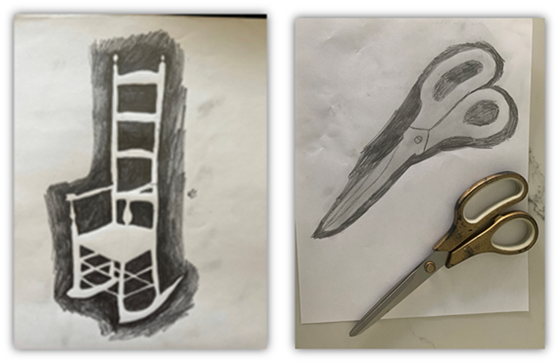
Provide an explanation or what motivated you to use this textbook or OER/Low Cost option. My motivation for using OER resource is to save students money for a textbook and to support the learning outcomes. The material is required, as it helps the students understand the fundamental skills needed to create effective software-based design solutions.
How did you find and select the open textbook for this course? Using the library, I searched for eBooks that may be useful for this course. Upon reading through a few resources, I decided this book was the most effective in preparing students for the course content.
Sharing Best Practices: The best practice I would suggest is talking with other faculty who teach the same course or similar courses, to discuss reading material they may be using for their content.
Describe any challenges you experienced, and lessons learned. The challenge with using OER materials is that some students may prefer actual books over digital versions. Given this, I remind students that they are free to purchase a physical book if they prefer.
Instructor Name Adrienne Martin
Adjunct Faculty - College of Arts and Letters
Lecturer in the Department of Art and Design
California State University, San Bernardino 
Please provide a link to your university page. https://www.csusb.edu/
Describe your teaching philosophy and any research interests related to your discipline or teaching. My philosophy on teaching is that “Every student is capable of learning, but it is up to the teacher to find that connection with each student that will help them learn the best.” The classes I've taught relate to a visual profession and my teaching approach is the same. Courses such as: Digital Applications Basics, Fundamental Design Principles, Typography and Layout, Application Programming for Designers and Branding and Identity Design require some type of visual output. All my students learn visually, based on the demands of the design industry, which I employ visual techniques to connect with my students. In conjunction, my continued use of auditory and kinesthetic teaching methods provides significant improvement with many of my students. Following directions, technical skills, and understanding what is being taught, is effective when utilizing a visual style of learning in conjunction with audio methods.
Use of the LMS system has been fundamental in supporting my teaching methods, by providing an online presence that all of my students can access via a computer or their mobile devices.
Textbook or OER/Low cost Title:
Drawing for Graphic Design: Understanding Conceptual Principles and Practical Techniques to Create Unique, Effective Design Solutions.
https://ebookcentral.proquest.com/lib/csusb/detail.action?docID=3399572
Brief Description: Using this textbook as a visual guide for how to sketch ideas/concepts using various techniques using the exercises provided. These techniques help students understand which works best for their ideas. The process of drawing is a powerful tool on many levels. It is an activity of invention, rather than appropriation, and so encourages originality. The gestural quality of sketched concepts, even if destined to become layouts only of type and photographs, imparts a vitality that a designer can look to as a goal to achieve in the final work. Most importantly, drawing fuses disparate skills on which designers rely on perception, cognition, and mechanics; verbal and visual narrative creation; analysis and intuition. -Author
Authors: Timothy Samara
Student access: Using their library account login, students search for the book using the “OneSearch” database or the website link provided in the LMS using any electronic device they may have. Students may read online via the library site using ProQuest eBooks or O’Reilly Books. ProQuest is preferred as students can download the entire book and read via their desktop or phone using Adobe Digital Editions for a check-out of 180 days at a time. Downloads of a chapter as a PDF is also possible via ProQuest.
Supplemental resources: PowerPoint slides, video content provided using Canvas (LMS)
Provide the cost savings from that of a traditional textbook. The physical book retails for $162.00. Since I teach this course to 24 students on an annual basis, the total potential savings for students is $3,888. If other sections of this course adapted the same book, the annual cost savings would be $15,552.00.
License: The licensed material is provided through an agreement with the CSUSB Pfau Library. If students are active, they will have access to the material.