
Recovering Unfinished Learning with Gooru's Math Navigator: An HBCU AL$-MERLOT INNOVATION PROJECT
Recovering Unfinished Learning with Gooru's Math Navigator: An HBCU AL$-MERLOT INNOVATION PROJECT
Welcome! The goal of this website is to provide you information you need to support your students using Gooru's FREE Math Navigator to recover and advance their high school level math skills so they can succeed in college as they return to classes after the COVID pandemic.
The HBCU Affordable Learning Solutions & MERLOT teams invites you to partner in a project supporting students whose instructional time was disrupted during the pandemic. This project focuses on helping students recover and rebuild high school math knowledge as they enter their freshman year of college. We know we still have much to learn, and we are here to collaborate with you to help your students find success at your institution.
 Dr. Robbie Melton
 Dr. Gerry Hanley
Unfinished Learning During the COVID Pandemic:
As a result of the COVID-19 pandemic, many incoming college freshmen will begin this academic year without having mastered foundational math concepts. High school seniors are among the many students who have lost learning opportunities and time to practice math skills. Even without a global pandemic, math knowledge and skills often pose major challenges for first-year students in college.
What can be done to help student find the learning they need to succeed?
What if we had a free service that students could use throughout their freshman year that provides individualized learning experiences, assessments, and feedback, all delivered on their smartphones?
FREE MATH NAVIGATOR: AN AFFORDABLE LEARNING SOLUTION!
Our Affordable Learning Solutions (AL$) program will provide free access to Math Navigator for students and instructors of HBCUs. Math Navigator is an online, self-directed platform that delivers the learning activities and resources that each unique student needs.
Math Navigator, already used by millions of students around the world, has been developed by Gooru , an educational non-profit organization and partner of MERLOT and SkillsCommons for the past 3 years.
You can explore Math Navigator for free at https://gooru.org/about/navigator/math-navigator/.
Real-Time Feedback for Learners: Learners get real-time feedback to promote agency and self-monitoring in order to optimize growth. In addition, learners have access to dynamic reports to track their own learning.
Evidence of Success: Review the research on successful learning outcomes among students using Math Navigator.
NOT QUITE READY TO DO THIS RIGHT NOW?
Gooru has team members on staff every day of the year. This means you can offer the free and open version of Math Navigator to your students throughout the year, whenever you’re ready.
LOOKING FOR AN INSTIUTIONAL STRATEGY?
If you’d like your institution to have access to data dashboards measuring student performance in Math Navigator, Gooru can provide this for $1 per student per year. With these dashboards, called Mission Control, instructors and administrators can track individual and cohort progress.
If you are interested in using Math Navigator as an institutional strategy, please contact Priti Agarwal at priti@gooru.org and complete the Gooru-University Membership MOU _ 2020-04.docx
Math Navigator is a FREE and OPEN adaptive online platform that provides personalized learning pathways for students to develop their math competencies. Faculty have FREE access to this platform as well where they have monitor their students' progress.
What does your institution need to do?
- Identify a staff member to be designated as "coordinator" for the Math Navigator project. As the title indicates, this person will be responsible for coordinating campus staff and resources to support students using Math Navigator. Coordination includes connecting with:
- Communications and/or student outreach department for distributing the announcement, invitation, and reminders about using Math Navigator.
- The institution’s Math Department so faculty are aware of and can encourage use of the tool.
- Professional Development Center for faculty to learn how to use Math Navigator with their students.
- Help desk or other services that students call if they are having technology issues. Gooru will provide help but there might be campus-specific needs.
- First-year experience and/or orientation staff who can include reminders to use Math Navigator.
- Learning Assistance Center or existing organizations currently used to support student academic success.
- Design an outreach campaign for your incoming first-year students that acknowledges:
- The challenges they had in their senior year of high school, especially in math.
- The importance of math skills to their success in college.
- That your institution will provide free and open access to an easy-to-use mobile app that will help them refresh, recover, and retain high school math skills.
- That your institution will reward students who complete their Math Navigator program by providing them benefits (e.g. early registration to classes, a campus sweatshirt, etc.).
- Send regular notifications and reminders about the importance of students’ progress on Math Navigator.
- At campus convocation or other events, celebrate those students who made significant progress on coming college-ready in math to their freshman year.
You can use the PLANNING TEMPLATE to identify the people and tasks that will help you use the Math Navigator.
Want To Learn MORE On How To Adopt Math Navigator?
MERLOT and Math Navigator will conduct webinars to review how your institution can adopt the tool and answer questions. Math Navigator will dedicate support services to HBCUs participating in this program.
- Sign Up - Teachers can go to their unique campus URLs [see below] and click on the Signup link. If your campus is not listed on the signup page with a unique URL, then email Priti Agarwal (priti@gooru.org)
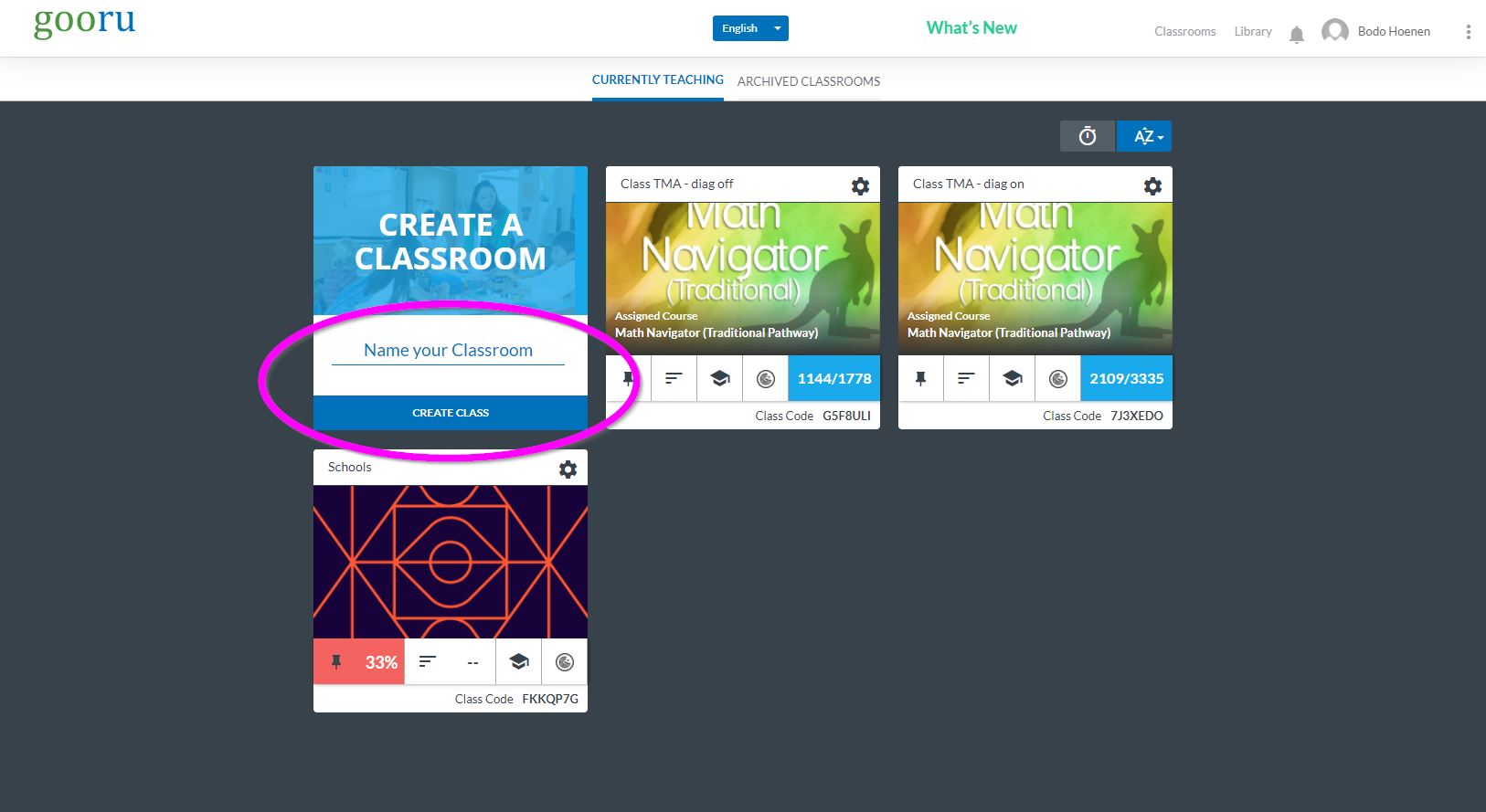
Create a class - name and create a new class, fill in the standards and grade
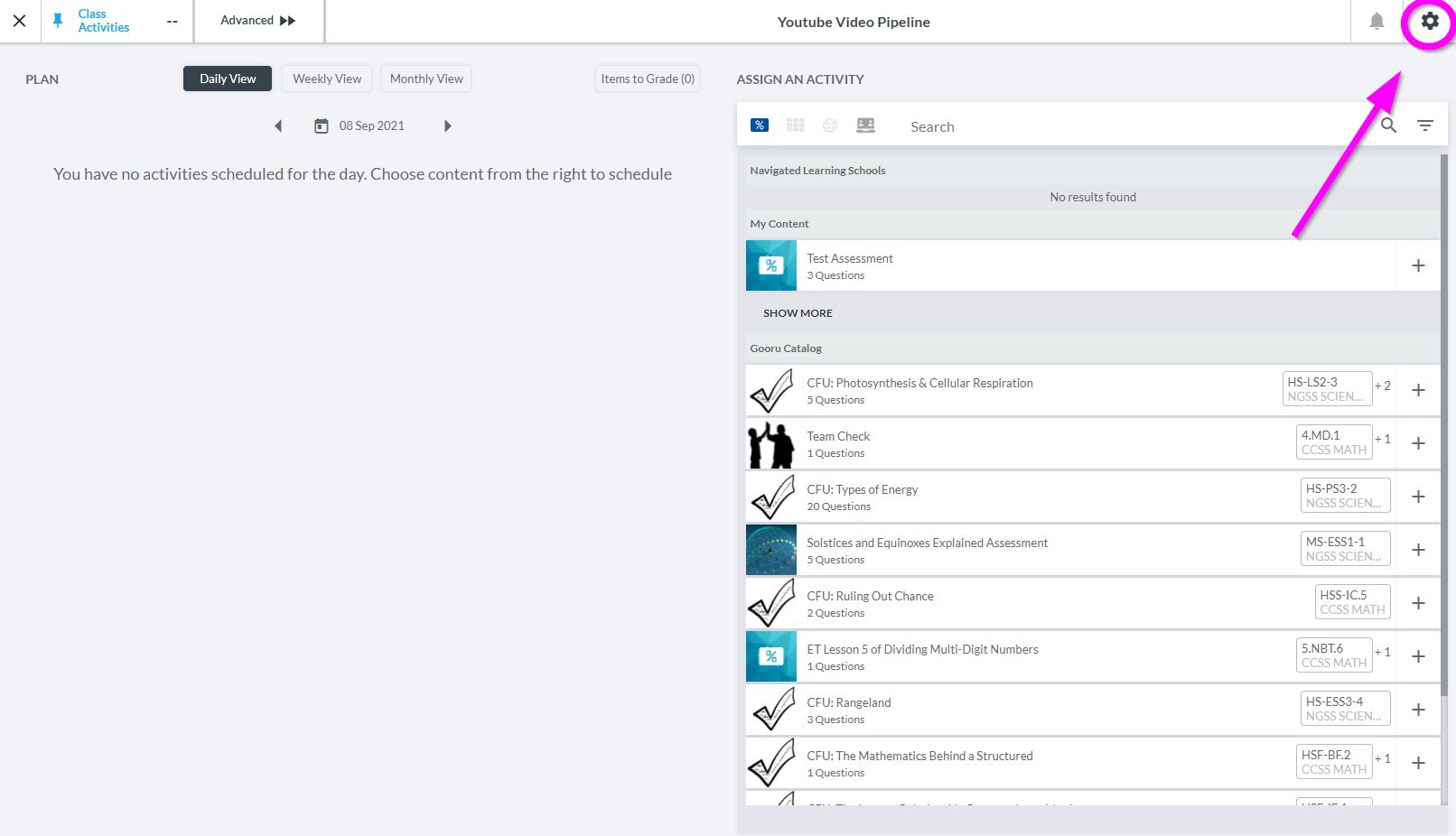
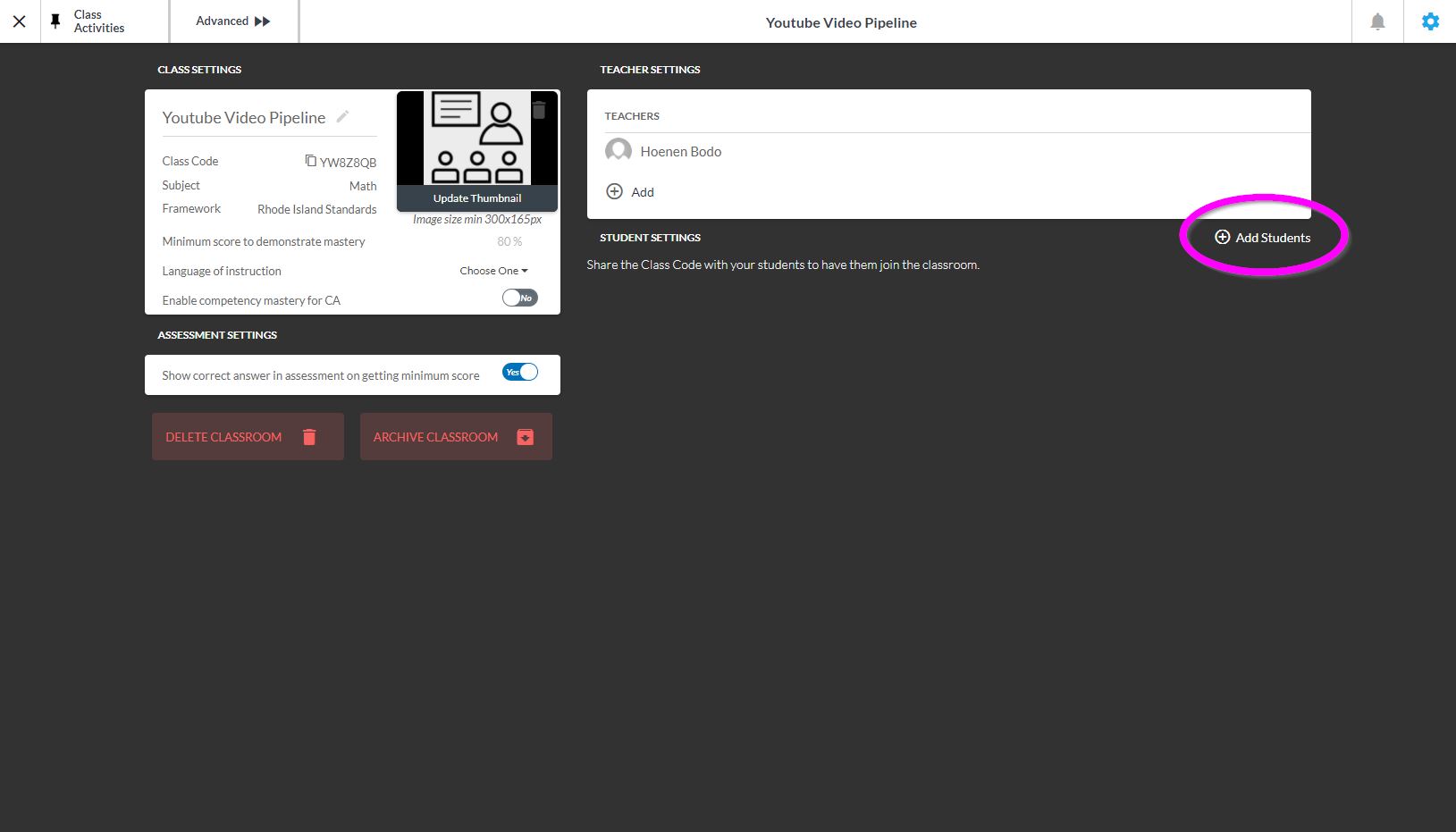
Add Your students - Click on the settings gear, top right, then search for and add your students.
- Arkansas Baptist College https://gooru.org/share/f8ad2a5b
- Bethune - Cookman University https://gooru.org/share/e6abd765
- Central State University https://gooru.org/share/d91128e3
- Claflin University https://gooru.org/share/9a014593
- Clark Atlanta University https://gooru.org/share/57af5b6a
- Denmark Technical College https://gooru.org/share/fca73b10
- Dillard University https://gooru.org/share/5da8ae70
- Edward Waters University https://gooru.org/share/bd27512c
- Fisk University https://gooru.org/share/993ab4a1
- Fort Valley State University https://gooru.org/share/d08614a5
- Johnson C. Smith University https://gooru.org/share/a1382523
- Lawson State Community College https://gooru.org/share/a8aadd25
- Lincoln University https://gooru.org/share/98098d46
- Morehouse College https://gooru.org/share/43e5134e
- Norfolk State University https://gooru.org/share/c2a27841
- Prairie View A&M University https://gooru.org/share/15a3c562
- Shorter College https://gooru.org/share/319604e6
- Simmons College of Kentucky https://gooru.org/share/9e2455db
- Southern University and A&M College https://gooru.org/share/4f1b2bd5
- Southern University Shreveport Louisiana https://gooru.org/share/99ca37e6
- Tennessee State University https://gooru.org/share/a3be05da
- Texas Southern University https://gooru.org/share/ce09ead2
- Tougaloo College, Mississippi https://gooru.org/share/56448fac
- Université virtuelle du Sénégal https://gooru.org/share/bc0ef1b1
- Wilberforce University https://gooru.org/share/504802e5
- Xavier University of Louisiana https://gooru.org/share/aacf46f4