MS Word Exercises (Part 1)
MS Word Exercises (Part 1)
Type of Assignment
Individual
Instructions
- Review the LinkedIn Learning resources on Microsoft Word. Use the exercise files and follow along activities will prepare you for the next steps.
- Download the file: MSWordExercise2.docx opens in new window and save on your computer.
- Format the file using the appropriate Word functions you learned so that it will look as close as possible (not exactly the same as) to the document or final draft below.
- SMALL HINT FOR GREEN BOX: Set, clear, or remove tab stops in MS Word opens in new window
- Save your final document as multiple file formats: .docx and .pdf.
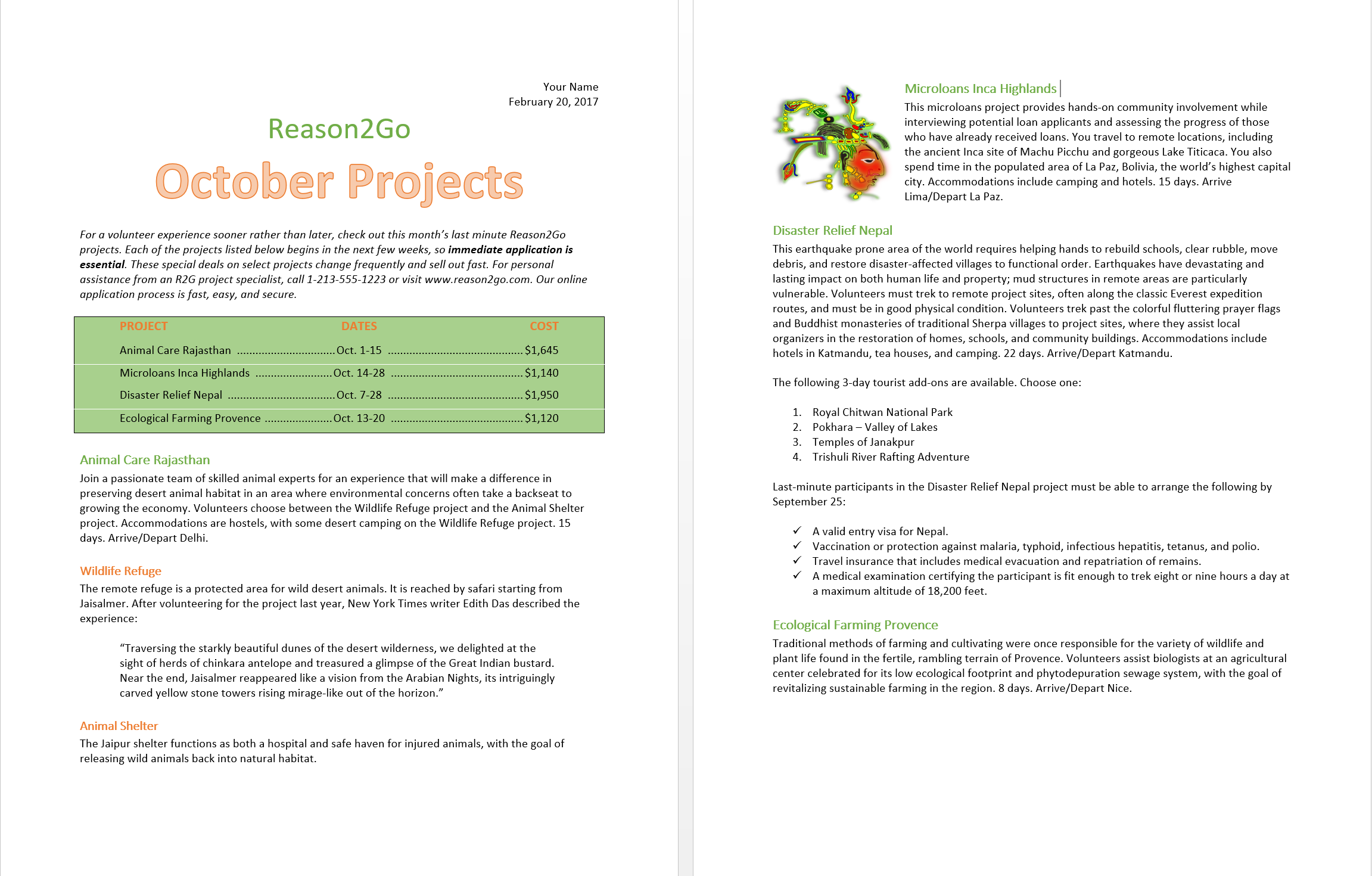
Grading Requirements
- 20 points
- Very similar to the final draft: 20 pts.
- Somehow similar to the final draft: 15-16 pts.
Submission
- Submit both files to the dropbox named: Dropbox: MS Word Exercises (Part 1)
Due Date
- Due by Wednesday, 5:00 pm PST of this week’s lesson.