
Jump Start Module: Becoming a Sand Shark
Jump Start Module: Becoming a Sand Shark
You are a Sand Shark now and we are so excited that you are here! This module will serve as a quick start guide to set you on the right path forward in your road to a college degree. Each of the topics below will help you get started.
By the end of this module students will be able to:
- Understand the expectations of college and how to be a good member of the USCB community.
- Explain the differences between High School and College.
- Define key terms that only apply to college or USCB.
- Understand the importance of their course syllabi and identify its key components.
- Communicate effectively with faculty when they need support.
- Find and access all university technology needed to start their college careers.
- Develop their own system for managing their University email so the do not miss important information.
- Form a basic understanding of the elements on online learning and create a success plan for online learning if/when it is necessary.
Being a Sand Shark means being an active member of the USCB community of learning. Members of this community receive the benefits of faculty with a wealth of knowledge, staff that are here to guide students on their path, and peers who will enhance their experience both inside and outside the classroom. Being part of this community also comes with responsibilities and expectations. Understanding those expectations and responsibilities is a very important first step on your path to a college degree.
What exactly is expected of you?
Expectations for student behavior vary from campus to campus. A Web search for “college student responsibilities” reveals the breadth of expectations deemed important at any given institution.
Overall students are expected to at least act consistently with the values of the institution and to obey local, state, and federal laws. It is also expected that you actively participate in your career decision-making process, respond to advising, and plan to graduate.
At USCB we require all students to live up to the tenets of the Carolinian Creed.
As a Carolinian...
I will practice personal and academic integrity;
I will respect the dignity of all persons;
I will respect the rights and property of others;
I will discourage bigotry, while striving to learn from differences in people, ideas and opinions;
I will demonstrate concern for others, their feelings, and their need for the conditions which support their work and development.
The USCB Student Handbook details other rights and responsibilities of USCB Students. Overall, you demonstrate that you are a responsible student when you do the following:
- Uphold the values of honesty and academic integrity.
- Arrive on time and prepared for all classes, meetings, academic activities, and special events.
- Give attention to quality and excellence in completing assignments.
- Allot sufficient time to fulfill responsibilities outside of class.
- Observe etiquette in all communications, giving respect to instructors, fellow students, staff and the larger college community.
- Take full advantage of college resources available.
- Respect diversity in people, ideas, and opinions.
- Achieve educational goals in an organized, committed, and proactive manner.
- Take full responsibility for personal behavior.
- Comply with all college policies.
By allowing these overarching principles to be your guide, you are embracing responsibility and making choices that lead to college success.
Adapted from: "College Success" by Linda Bruce, Lumen Learning is licensed under CC BY 4.0
Being a Good Community Member during COVID-19
Starting your First-Year of college in the middle of a global pandemic was probably not what you imagined. USCB is doing everything we can to limit the spread of COVID-19 on campus, but this cannot be accomplished without every student doing their part to mitigate the risk. You were required to complete the COVID-19 Health Training for Students prior to coming to campus. This section will review some of the things you learned in that training and allow you to reflect on how you can use that information to protect yourself and your USCB community.
Wearing a Mask
You learned in your COVID-19 Health Training that the main way COVID-19 is transmitted is through inhaling droplets that expel from an infected person's mouth. The Center for Disease Control (CDC) recommends that to mitigate the risk of infection, everyone should wear a mask and stay at least 6 feet apart from others in public settings. In the short video below Elizabeth McGraw, the Director for the Center for Infectious Disease Dynamics at Penn State, explains the importance of wearing masks, how they work, and how to wear them properly.
It is important to understand that masking is the most effective when everyone in the USCB community is wearing a mask in public spaces.
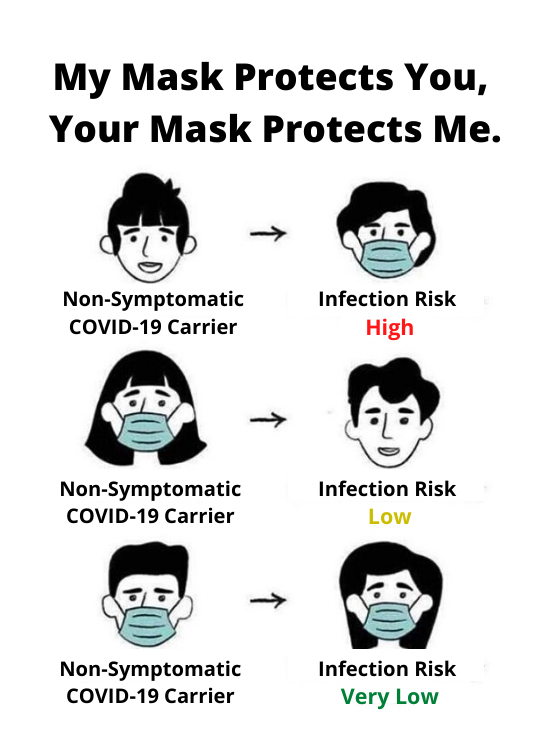
Source: https://masks4all.co/
Hand-Washing
Though research shows that you are less likely to contract COVID-19 through touching infected surfaces than through breathing in droplet, washing your hands and avoiding touching your face is still an important step in fighting the spread of COVID-19. The video below by the American Heart Association explains the science of why hand-washing is so important.
Now that you know know why hand-washing is important, it is important that you know how to do it properly. According to the World Health Organization, "washing your hands properly takes about as long as singing 'Happy Birthday' twice." Follow the steps below to wash your hands effectively:
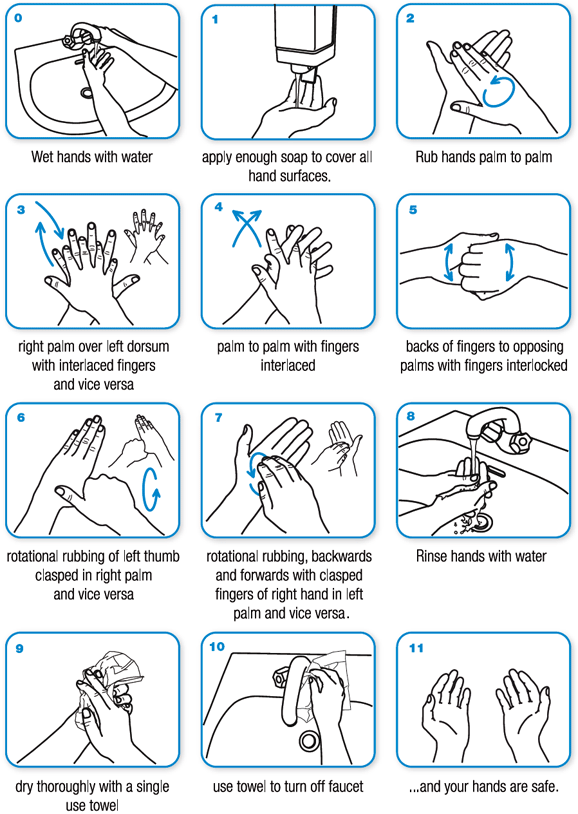
Source: https://www.who.int/gpsc/clean_hands_protection/en/
Sometimes washing your hands may not be possible. It is important that you carry the hand sanitizer the University provided with you so that you can clean your hands when soap and water is not readily available.
The university also provided you with a germ key in your health kit. This key can be used to avoid touching frequently touched surfaces.
Having a mask, hand sanitizer, and a germ key with you might be a difficult habit to get into when you aren't used to it. What are some things you can do to make it easier to keep these items with you?
Cleaning Your Personal Space on Campus
One important step to mitigating the risks of COVID-19 is to sanitize your personal space on campus regularly. Like visiting a gym, you need to sanitize any public space you use on campus before using it. This includes your desk in classrooms, your table in the dining hall, and the computers in the Library. Sanitation wipes will be available for you to use throughout campus. Taking these small steps is the most efficient way to prevent the spread of germs and bacteria on campus.
Daily Health Self-Screening
We are asking all students to self-screen for COVID-19 Symptoms daily and contact uscbcovid19@uscb.edu if you are experience any of the following symptoms:
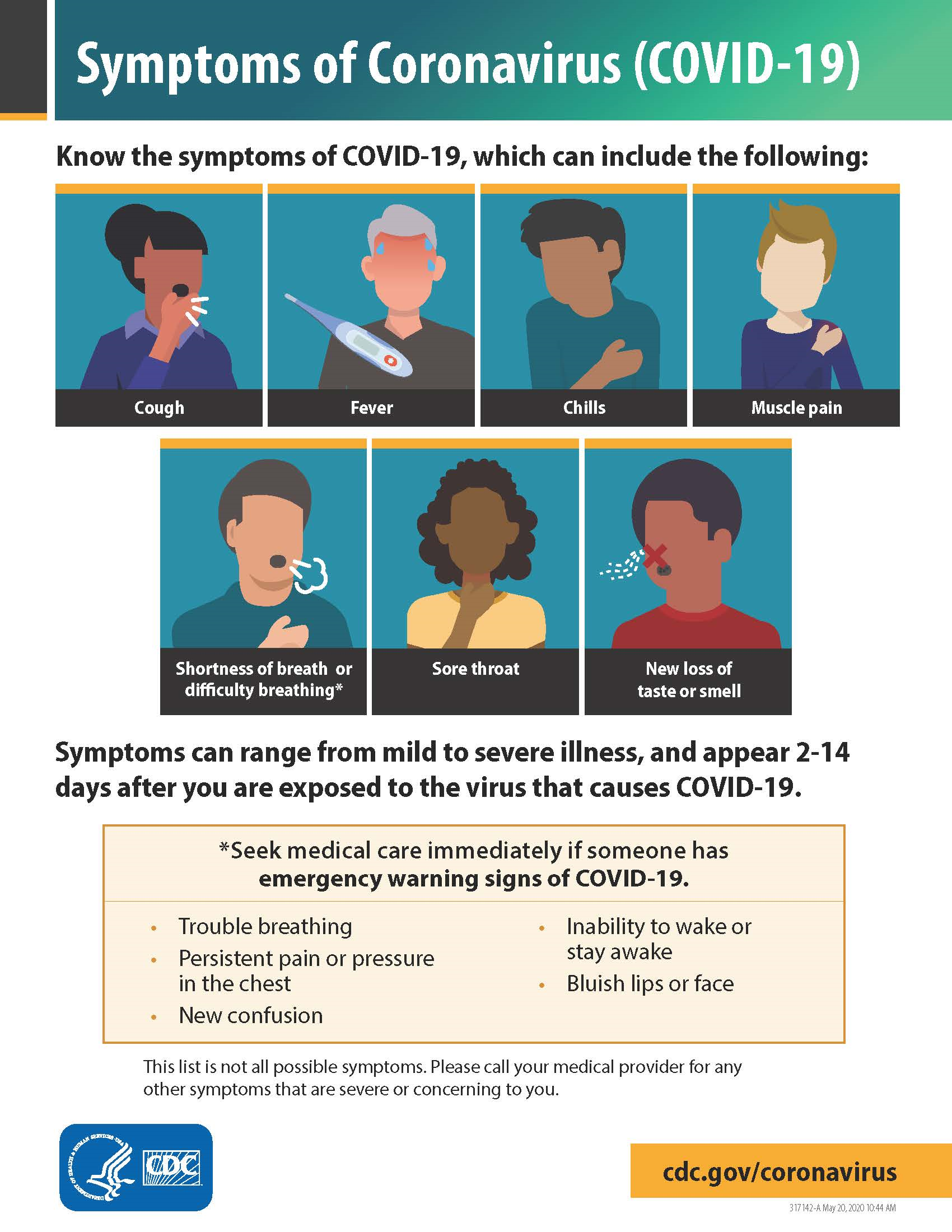
Source: https://www.cdc.gov/coronavirus/2019-ncov/symptoms-testing/symptoms.html
Students can also use the CDC Self-Checker, an interactive tool that will help you determine if you need to quarantine or get tested for COVID-19.
Healthy Behaviors Outside the Classroom
USCB has instituted rules about wearing masks inside the classroom and other public spaces on campus. However, it is also important that you make healthy choices outside of the classroom as well such as:
- Wearing you mask off campus
- Washing your mask regularly
- Staying at least 6ft apart from other whenever possible
- Avoiding places where social distancing is difficult
Below is a graphic created by the Texas Medical Association. According to their website, "The chart is intended as a guide, prepared by physician experts, to help Texans make smart and educated choices of activities to pursue amid the COVID-19 pandemic." This is obviously not a comprehensive list, but as you can see, some activities are riskier than others. Regardless of the risk indicated, any activity is risky if you do not wear a mask and practice social distancing of at least 6 feet.
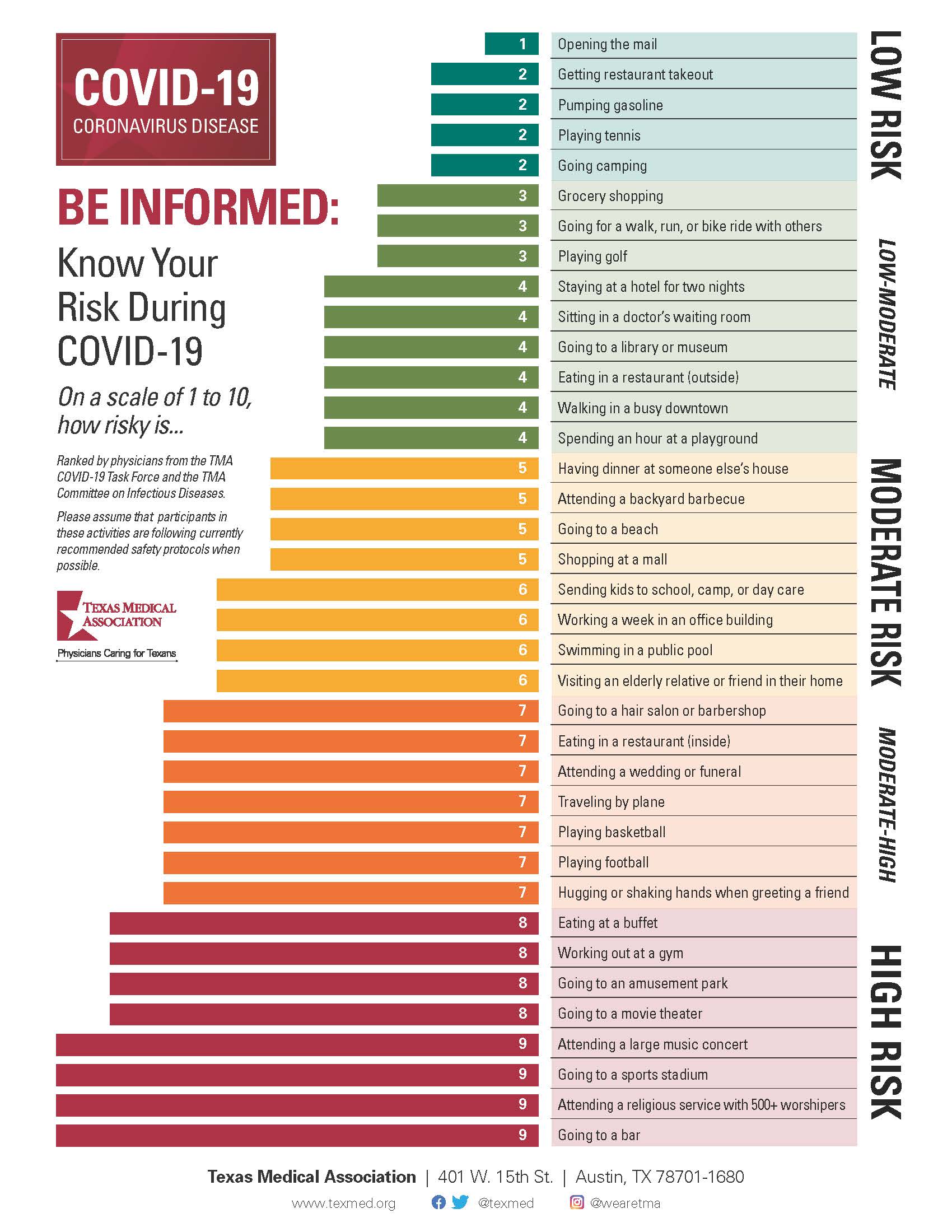
Source: https://www.texmed.org/coronavirus/
Activity
Review the Carolinian Creed and answer the following questions:
1. Why do we ask USCB students to follow this Creed? What is it important?
2. For each tenet of the Creed, what is an example of how you can follow the Creed as a student?
3. Which tenet(s) do you feel apply to your responsibilities to help mitigate the spread of COVID-19 on campus?
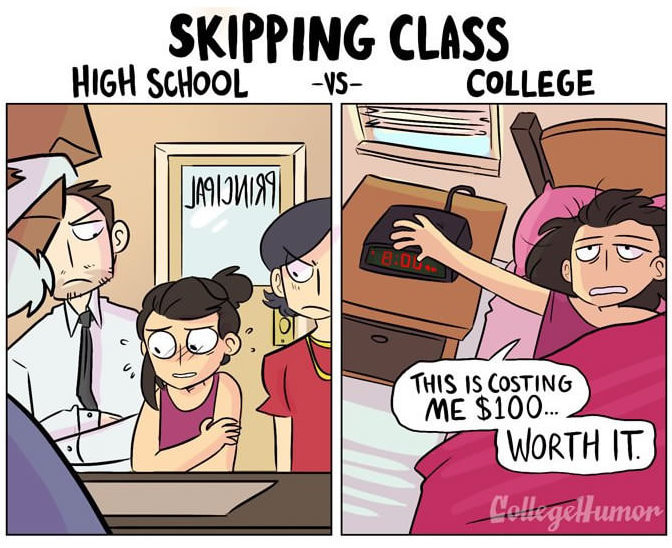
If you know others who attend or have attended college, then you have a head start on knowing what to expect during this odyssey. Still, the transition from high school to college is striking. College life differs in many ways.
Adapted from: "College Success" by Linda Bruce, Lumen Learning, licensed under CC BY 4.0
| FOLLOWING THE RULES IN HIGH SCHOOL | CHOOSING RESPONSIBLY IN COLLEGE |
| High school is mandatory and usually free. | College is voluntary and expensive. |
| Your time is structured by others. | You manage your own time. |
| You can count on parents and teachers to remind you of your responsibilities and to guide you in setting priorities. | You must balance your responsibilities and set priorities. You will face moral and ethical decisions you have never faced before. |
| Each day you proceed from one class directly to another, spending 6 hours each day--30 hours a week--in class. | You often have hours between classes; class times vary throughout the day and evening and you spend only 12 to 16 hours each week in class |
| Most of your classes are arranged for you. | You arrange your own schedule in consultation with your adviser. Schedules tend to look lighter than they really are. |
| You are not responsible for knowing what it takes to graduate. | Graduation requirements are complex, and differ from year to year. You are expected to know those that apply to you. |
| Guiding principle: You will usually be told what to do and corrected if your behavior is out of line. | Guiding principle: You are expected to take responsibility for what you do and don't do, as well as for the consequences of your decisions. |
| GOING TO HIGH SCHOOL CLASSES | SUCCEEDING IN COLLEGE CLASSES |
| The school year is 36 weeks long; some classes extend over both semesters and some don't. | The academic year is divided into two separate 15-week semesters, plus a week after each semester for exams. |
| You may study outside class as little as 0 to 2 hours a week, and this may be mostly last-minute test preparation. | You need to study at least 2 to 3 hours outside of class for each hour in class. That means that students enrolled in 15 credits need to study at least 30 hours per week. |
| You seldom need to read anything more than once, and sometimes listening in class is enough. | You need to review class notes and read assigned text prior to each class. |
| You are expected to read short assignments that are then discussed, and often re-taught, in class. | You are assigned substantial amounts of reading and writing which may not be directly addressed in class. |
| Guiding principle: You will usually be told in class what you need to learn from assigned readings. | Guiding principle: It's up to you to read and understand the assigned material; lectures and assignments proceed from the assumption that you've already done so. |
| HIGH SCHOOL TEACHERS | COLLEGE PROFESSORS |
| Teachers check your completed homework. | Professors may not always check completed homework, but they will assume you can perform the same tasks on tests. |
| Teachers remind you of your incomplete work. | Professors may not remind you of incomplete work. |
| Teachers are often available for conversation before, during, or after class. | Professors expect and want you to attend their scheduled office hours. |
| Teachers have been trained in teaching methods to assist in imparting knowledge to students. | Professors have been trained as experts in their particular areas of research. |
| Teachers provide you with information you missed when you were absent. | Professors expect you to get from classmates any notes from classes you missed. |
| Teachers present material to help you understand the material in the textbook. | Professors may not follow the textbook. Instead, to amplify the text, they may give illustrations, provide background information, or discuss research about the topic you are studying. Or they may expect you to relate the classes to the textbook readings. |
| Teachers often write information on the board to be copied in your notes. | Professors may lecture nonstop, expecting you to identify the important points in your notes. When professors write on the board, it may be to amplify the lecture, not to summarize it. Good notes are a must. |
| Teachers impart knowledge and facts, sometimes drawing direct connections and leading you through the thinking process. | Professors expect you to think about and synthesize seemingly unrelated topics. |
| Teachers often take time to remind you of assignments and due dates. | Professors expect you to read, save, and consult the course syllabus (outline); the syllabus spells out exactly what is expected of you, when it is due, and how you will be graded. |
| Teachers carefully monitor class attendance. | Professors may not formally take roll, but they are still likely to know whether or not you attended. |
| Guiding principle: High school is a teaching environment in which you acquire facts and skills. | Guiding principle: College is a learning environment in which you take responsibility for thinking through and applying what you have learned. |
| TESTS IN HIGH SCHOOL | TESTS IN COLLEGE |
| Testing is frequent and covers small amounts of material. | Testing is usually infrequent and may be cumulative, covering large amounts of material. You, not the professor, need to organize the material to prepare for the test. A particular course may have only 2 or 3 tests in a semester. |
| Makeup tests are often available. | Makeup tests are seldom an option; if they are, you need to request them. |
| Teachers frequently rearrange test dates to avoid conflict with school events. | Professors in different courses usually schedule tests without regard to the demands of other courses or outside activities. |
| Teachers frequently conduct review sessions, pointing out the most important concepts. | Professors rarely offer review sessions, and when they do, they expect you to be an active participant, one who comes prepared with questions. |
| Guiding principle: Mastery is usually seen as the ability to reproduce what you were taught in the form in which it was presented to you, or to solve the kinds of problems you were shown how to solve. | Guiding principle: Mastery is often seen as the ability to apply what you've learned to new situations or to solve new kinds of problems. |
| GRADES IN HIGH SCHOOL | GRADES IN COLLEGE |
| Grades are given for most assigned work. | Grades may not be provided for all assigned work. |
| Consistently good homework grades may raise your overall grade when test grades are low. | Grades on tests and major papers usually provide most of the course grade. |
| You may graduate as long as you have passed all required courses with a grade of D or higher. | You may graduate only if your average in classes meets the departmental standard--typically a 2.0 or C. |
| Guiding principle: Effort counts. Courses are usually structured to reward a "good-faith effort." | Guiding principle: Results count. Though "good-faith effort" is important in regard to the professor's willingness to help you achieve good results, it will not substitute for results in the grading process. |
Adapted from: "Transitioning to life at SMU"
Activity: Your High School Experience
The comparisons between High School and College listed above are generalizations and may not apply to you. In this activity, explain your high school experience in each category below. Then explain how you think it will be similar or different in college.
Studying
Social Life
Your Relationship with Teachers
Your Extracurricular Activities
Attendance
Parental Involvement in your Education
Getting started in college can seem like an uphill battle. One of the first challenges a student can encounter is navigating the college’s website. In the attempt to get as much information as possible into the hands of current and future students, college websites are crammed full of information and language that may be new to the first-time college student. Trying to figure out how to get started can be confusing, even when the website says, “Steps To Enroll.” Registration, admission, enrollment… are they all the same thing? If you are registered, are you admitted and enrolled? Is enrollment in the college the same thing as enrollment in classes? And that’s just the beginning of the potential for confusion! How can a student know the answers to these questions?
Learning to speak the “language of college” can seem even harder than learning a foreign language because as a new student, you have no idea what words you need to learn. If you travel to a foreign country, there are core vocabulary words you will find most helpful – resources that will allow you to order the food you like and services you need. Basic needs like bread and water can be correlated among different languages. A dog is a dog all over the world and not confused with a cat. The vocabulary of college is not so straightforward.

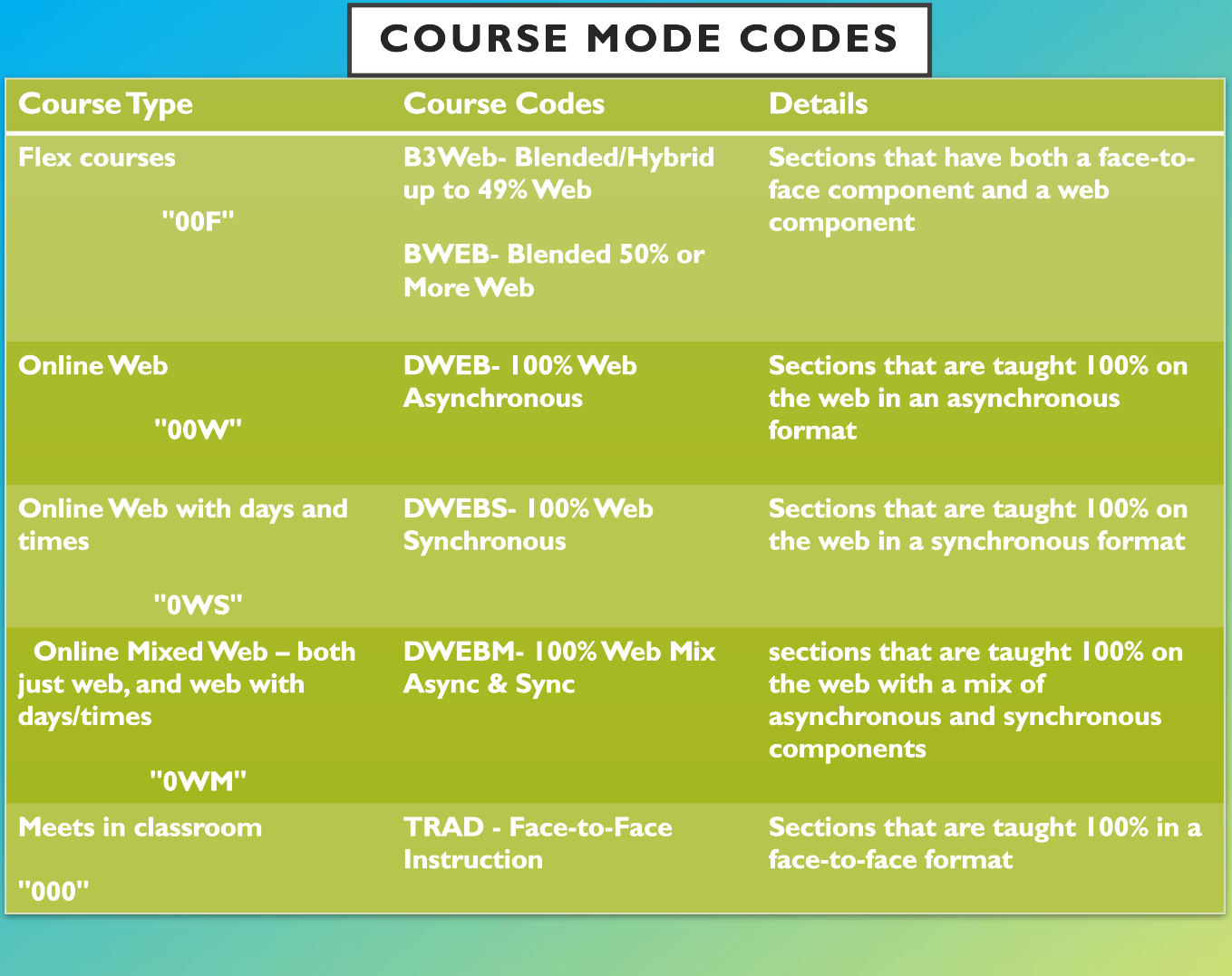
One of the first things you will have to figure out this fall is the format your classes are being taught. This is probably not something you would have had to worry about prier to the COVID-19 global pandemic. Since the University has to limit the size on face-to-face classes your schedule may be a mix of in-person, synchronous and asynchronous classes and different section codes on your schedule mean different things. Below is a chart of all the course modalities USCB is offering this fall with an explanation of what they mean.
Activity: Commonly Used Academic Vocabulary
Learning to speak the language of the college is part of learning the school’s culture. Below is a list of commonly used terminology at USCB. Without using the Internet or college catalog, see how many words you know the meaning of. Write the meaning in the space adjacent to the term.
| Academic Vocabulary Word | Meaning |
| Advisor | |
| Bursar's Office | |
| Credit Hour | |
| Curriculum | |
| Elective | |
| Plagiarism | |
| Prerequisite | |
| Probation | |
| Registrar | |
| Syllabus | |
| Transcript |
USCB Glossary of Terms
Now that you've made your best guess about the meaning of each of the words above, check your work. USCB has created a USCB Glossary of Terms.pdf terms to help you better understand the language we use on campus.
Adapted from "Blueprint for Success in College and Career" BY Dave Dillon, Rebus Community, licensed under CC BY 4.0

What is the course syllabus?
In the last section "The Language of the University" you learned that a syllabus is an outline of the professor’s plans for the course that includes assignments, exam dates and projects. The syllabus lays out all the requirements, expectations, and policies of the course. It also gives you the course objectives and learning outcomes for the course, which is essentially a blueprint of what you are going to learn. You can also think of a course syllabus as a contract between you and your instructor, because if you meet all of the requirements laid out in the syllabus and meet all of the learning outcomes, you will pass the course. This is why it is so important that you read the course syllabus for each of your classes the way you would read a contract before you signed it.
Common Course Syllabus Sections
Though every instructors course syllabus is different, almost every syllabus will have the following sections:
Instructor's Information
This sections will likely give you your instructor's name, office location, email address, and office hours. If you need to get in touch with your faculty member, you can go to this section and find the information you need to get in contact with them.
Required Course Materials
Though you can usually find your required textbooks for a class prior to the beginning of the term on the USCB Bookstore's website, any required texts will be listed here as well. You might also find that there are some items you need that aren't textbooks like an app you need to download or a school supply you will need like a planner. Always check this section to make sure you have everything you need.
Course Description, Course Objectives, and Learning Outcomes
This is a required component for every course syllabus. This section will give you a list of everything you should have learned once you have successfully completed the course. It is important to look this section over. This will give you a clear idea of what is expected of you in the course.
Course/University Policies
There are two types of course policies:
- Standard University policies that apply to all USCB courses. Examples of these are academic integrity policies and policies for students with disabilities. This fall there will be COVID-19 course policies that you will see on your syllabi.
- Instructor Policies that are important to your instructor. Examples include food and drink policies, cell phone usages policies, and late work policies. Pay close attention to these policies because they will give you a lot of information about your instructor. You can usually tell their pet peeves and non starters form this section. For example, if an instructor has a really strict attendance policy, then you know that missing class on a whim is a bad call in their class. Also, some of your professors may have additional COVID-19 related policies that are more strict than your other classes. You need to remember that your instructors have lives outside of USCB. You don't know if they are in a high risk category, take care of an elderly parent, or are simply very anxious about their health and safety. Please respect these policies and guidelines so your instructors can continue to feel safe in their teaching environment.
Evaluation Criteria/Grading Scale
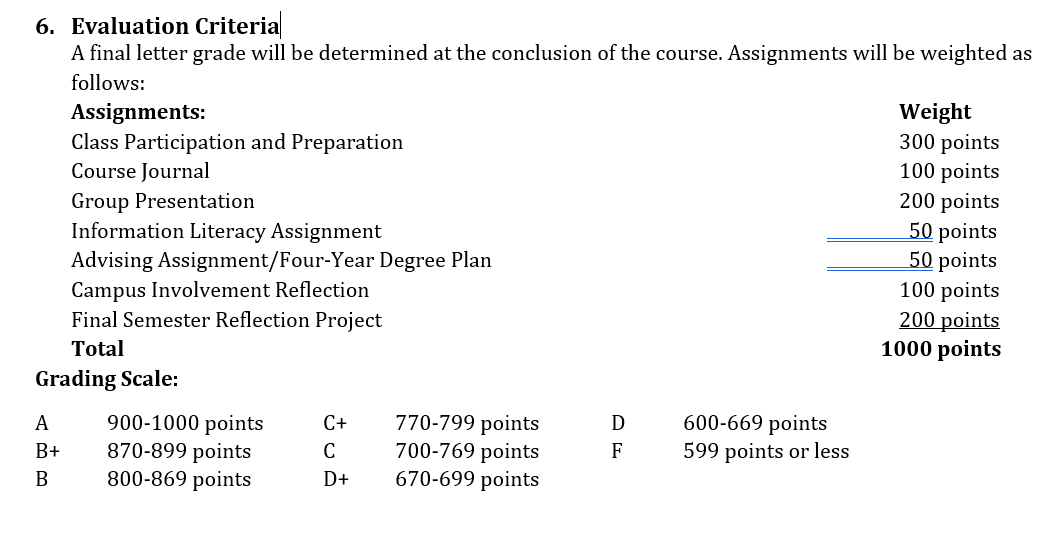
This is where you find out how your grade will be determined. You should be able to see the major assignments and tests you will have to complete during the course, the weight of each, and the scale your instructor will use. Weight of a grade refers to the percentage an assignment is worth to your final grade. Your grades are not equally weighted. A final exam will likely be worth more than your homework assignments. The grading scale tells you what score you need to earn in order to get an A, B, C, D, or F. Below is an example Evaluation Criteria and Grading Scale.
Description of Assignments
This is a brief description of the assignments listed in the evaluation criteria. Sometimes these descriptions will give you all the information you need to complete the assignment, but some instructors will also provide an assignment sheet. The due date for the assignment will sometimes be included in this section, but sometimes you will find this information in the course schedule.
Course Schedule
When you get to this section of your syllabus, you need to get your planner out. This section will give you due dates for major assignments, reading assignments for each class session, and the topics that are going to be covered in class each day. Faculty put this information in the syllabus and expect you to keep up with it. Some instructors will not remind you in class about an assignment due date or an upcoming exam. You should use a planner to log all the important due dates and deadlines in all your classes so you can get an idea of when you are going have a lot of work due in the same week. This will allow you to get a head start so you aren't so stressed.
Activity: Where Can I find this in the Syllabus?
Below is a list of scenarios involving issues that might come up during the semester. For each one determine which section of the syllabus you should look to to help you through the situation.
| Scenario | Syllabus Section(s) |
| You wake up sick and you can't make your exam. You don't know what to do. | |
| You have a 75 in the class and you need at least a C for your scholarship. | |
| You can't remember if you are supposed to reach section 2.5 or 2.6 for class tomorrow. | |
| You are running late and have enough time to grab lunch but not eat it. You aren't sure if you can bring your lunch to class. | |
| You bought your textbooks in advance, but you aren't sure if you should take the shrink rap off the book yet in case it isn't required. | |
| You want to get an idea of what you are going to be expected to learn in the course this semester before the add/drop deadline. | |
| You have an accommodation letter from Accessibility Services, but you can't remember what to do with it. |
Talking to your instructors is often intimidating for students, but you shouldn't feel that way. Faculty at USCB care about you and want you to be successful. You should always reach out to them or a staff member if you are having difficulty. Below is some information you should keep in mind when communication with your instructors.
How to Address Your Faculty
Figuring out how to address a faculty member can be extremely confusing. In high school you probably addressed all of your teachers as Ms. or Mr. You might have had a few teach with a doctorate that you addressed as Doctor.
In college it is a little different, a lot of your faculty have degrees that give them the Dr. title, but some don't. So when interacting with them how can you tell? The first place you should look is the Instructor Information section at the top of the syllabus. If they have Ph.D or Ed.D after their name, then Dr. should be put in front of their last name when you are addressing them. If this information is not on the syllabus it might be on the department website or in their email signature.
It is totally okay to ask your professor if you cannot find the information. If you need to send the instructor and email before you can ask, it is acceptable to address them as Professor until you know for sure. If your instructor doesn't have a doctorate then you should address them as Ms. or Mr. unless they tell you to address them differently. It is important that you never assume your instructor does or doesn't have a doctorate degree based on their age, gender, race or ethnicity.
Office Hours
Office hours are time set aside by faculty to interact with their students and answer any questions that couldn't be asked in class. All faculty are required to hold office hours even if they are by appointment only. It is important to remember that this isn't work or grading time for faculty, this is time specifically for students. You should not feel like you are bothering your instructors when you attend their office hours, but you should follow some etiquette rules when you go.
- Make sure you knock before you enter their office. They may have another student with them, be on the phone, or have next weeks exam up on their computer screen. Give them the opportunity to prepare for you to enter their office.
- Don't interrupt other meetings. Wait in the hall outside the office out of earshot so you don't accidentally listen in on your instructor's conversation with the student ahead of you. This is especially important if your instructor shares an office with multiple faculty and may not have a door to close.
- Respect the hours set on the syllabus. If office hours end at 1pm, don't show up at 1:05pm. If the hours listed on the syllabus don't work with your schedule, email your instructor to ask for an appointment at a different time.
- In the beginning of the term make sure you introduce yourself and always remember to remind your instructor which section of their class you are in.
- Put your phone away. Before entering your instructors office, put your phone in your backpack and turn the ringer off. Don't text, check social media, or make phone calls while in their office.
- Come prepared. If you have questions from the last class session, write them down. If you want to go over an assignment sheet, bring it with you. This will show your instructor that you respect their time.
Below is a video that shows the dos and don'ts of office hours.
Communicating about Difficulties with your Faculty
At some point in your time in college you may experience difficulties that you will need to discuss with our faculty. Remember that your instructors want you to be successful. Sometimes life gets in the way of your success and you need some help. Though there is no guarantee that faculty will be willing to work with you when you experience difficulties in your life outside of school, there are some practices that will increase the chance that a faculty member will work with you.
- If you need to miss class because you are sick or some other unforeseen circumstance, let your instructors know as soon as you can. Don't wait two weeks to explain to your instructor that you missed the exam because of a care accident. When students wait a long time to explain absences to instructors, it seems like the student is making up an excuse. To avoid this, email your instructor as soon as you realize there is a problem.
- Document everything. If you are sick and you visit a doctor, always ask for a doctor's note. If you are caring for a sick relative get documentation of that too. Most of the time your instructors won't ask for it, but if you get in a situation where their is a bigger issue and you need to consider a medical withdraw or ask for incompletes, it is better to have already collected the documentation.
- Don't waste absences on sleeping in or going to the beach. Most instructors allow a few "no questions asked" absences and they will be less likely to work with you when you have an emergency if you have already used those up.
- If you need an extension ask for is as soon as possible. Waiting until the day the assignment is due will not go over well. If you are feeling overwhelmed by the assignment, got to your instructor's office hours and discuss this with them in advance. They might be able to help you overcome the issues you are having so you can turn the assign in on time.
- Never no show class on a day an assignment is due and hope you can just turn it in late.
- Finally, when you do need to miss class, ask a classmate for their notes and to fill you in on what you missed. Never, under any circumstance ask an instructor, "Did I miss anything?" You should always assume anytime you miss class, that you have missed something.
Emailing Faculty

When you email an instructor you need to do so professionally. Emails are more formal than other types of communication and if you aren't clear, you can be easily misunderstood. Also, instructors receive a lot of emails every day. Well written emails that make it easy for the instructor to answer are more likely to get a timely response. Below are some general guidelines for emailing your instructors.
- Subject lines are important. They need to clearly state the reason for your email. This will help your instructor fully understand your request.
- At the beginning of the email state your full name, the course you are in, and the section number. Remember professors may teach 5 sections of your course and they can help you faster if they have all the information up front. Don't assume that just because your instructor knows your name, that they can also remember which class you are in.
- Don't use text message lingo, abbreviate words, or use emojis. You need to also use proper punctuation. It does not need to be the perfect, but please keep in mind that a missing comma, can drastically change the meaning of a sentence.
- Make sure you give context to your request. If you need to know if your instructor can explain an assignment, include the assignment title and the exact issue you are having. Don't say something vague like, "I need help with my paper." Try to be as specific as possible.
- Finally, check the syllabus before you email to make sure you can’t find the answer to your question there! Faculty spend a lot of time on their course syllabus and the answer to a lot of your questions can be found there.
Below are examples of what student emails to faculty should and shouldn't look like:
| What You Shouldn't Do | What you Should Do |
| Subject: | Subject: Issue Submitting Assignment for ENGL B101 |
| Did u get my paper? | Dr. Swofford, My name is Laura Bessent. I am in section 3 of your ENGL B101 class that meets on Tuesdays and Thursdays at 9:25. I am writing because I had an issue today when I went to submit my paper on Blackboard. I kept trying to submit it but I got an error every time saying the file was too large. I think I finally got it go through, but now I can’t see if it was submitted. I know it is due today and I am worried you did not receive it. I know you said in the syllabus that you only except papers through Blackboard, but I have attached my paper to this email just in case it did not go through. If you could let me know that you did receive my paper I would appreciate it. Please let me know if you need me to do anything else. Sincerely, Laura |
Activity: Draft Your Own Email
Choose one of your courses and draft an email to one of your instructors about an issue you are having. If you aren't currently having any trouble use the scenario in the example email above.
Shortly after being accepted to USCB you probably realized that there was a lot of different technologies and systems that you had to learn how to use. Now that there is an online component to most USCB courses and a lot of campus activities have moved to a virtual format because of the COVID-19 Pandemic, there are even more systems that you have to learn to navigate. It can be really overwhelming! In this section you will find a guide to some of the technology you will need to complete your degree.
How to Log in to University Systems
When you were accepted to USCB you were given a set of numbers and IDs that the University generated for you specifically. It was a lot of information and it is easy to become really confused about what you use each piece of information for.
- University Email: ex smith2@email.uscb.edu or smith2@email.sc.edu. The email address the university assigned to you. You will receive updates and communication from the University, your faculty, and your advisors here.
- Network Username: (also call Net ID) This is usually the 1st part of your email address before the @. You will use this to log into University computers and some University systems like the software Inspire you will use to set up a meeting with your advisor.
- VIP ID: This is a student ID number that you need to memorize. You will need this to log into most (but not all) University systems. When interacting with staff across campus (such as Financial Aid, the Cashiers Office, and Academic Advising), you might be asked to provide this ID number to them so they can look up your academic record.
- Banner ID: (Also call your USC ID) This is another student ID number that faculty and staff will use to look up your student information. This ID will not be used to log into any University systems. The Banner ID and VIP are mostly interchangeable, but sometimes a staff member will request the Banner ID specifically. However, you do not have to worry about memorizing it. You can always find it on the back of your USCB Student ID Card.
- Duo Authentication: Also referred to as multifactor authentication. This is a program that requires to you to use your phone as a second verification when you log into a University system. If you haven't set up Duo Authentication yet, you can find instructions here.
Overview of Important University Systems
Your USCB email account is the only way you should be communicating with faculty, staff, and other students. You will receive important information through your USCB email every day and it is important that you know how to access it.
Accessing your email:
Accessing your email through Webmail is easiest way to check your email and will allow you to do so from any computer or device. In the video below you will see how to access your USCB email through Webmail.
Putting your email on your phone:
You can also easily access your USCB email through an app on your phone. To find a how-to guide for putting your email on your smartphone click here for both Android and Apple iOS.
Downloading the Office Suite
All USCB students have the ability to download Microsoft Office free of charge. You can download the Office suite on any computer including a PC and a Mac. Downloading Office is very important because many of your instructors will only be able to open assignments that are submitted using Office software such as Word, Excel, or PowerPoint. Once you download Office you will also be able to set up your USCB email on your computer through the Outlook App. This will allow you access your email without having to log into Webmail every time you get on your laptop.
Microsoft OneDrive
Another tool that you access through your USCB email is OneDrive. This is a system that allows you to save and share documents and access them from anywhere. In the video below, you will see how you can access OneDrive, upload and create documents and share documents with other.
Microsoft Teams
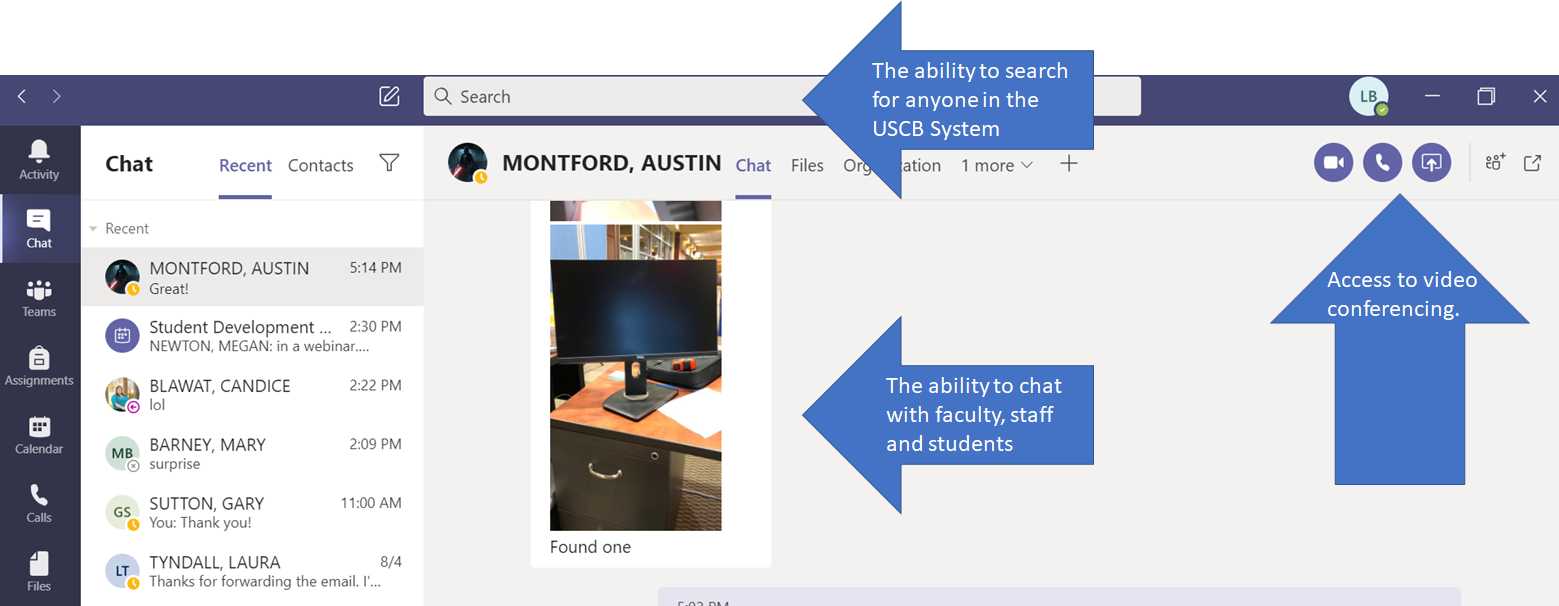
Once you have downloaded Microsoft Office 365 to your computer, you will have access to a application called Teams. This app will allow you to collaborate with peers, chat with faculty, and video conference anyone at the University. You can also download the Teams app on your smartphone.
Once you locate the Teams icon on your computer or download it on your smartphone, you should log in using your USCB email and password. Once you are logged in, you will have access to the features in the image below.
Self-Service Carolina (my.sc.edu)
Self-Service Carolina houses your student information and you will have to log in for a variety of reasons. Later in our course we will discuss the academic advising process and dig into this site further, but as a new student it is important that you have a basic overview and understanding of the site. Watch the video below for a quick guide to what you will find in my.sc.edu.
USCB Information Technology Services and Support (ITSS)
If you have any issues accessing any of these systems or any other USCB technologies please reach out to ITSS. They are able to help you with a variety of problems. Students can call ITSS at 843-208-8086. You can also find more how-to guides on using University Technology on their website: www.uscb.edu/itss.
Activity: University Technology Check List
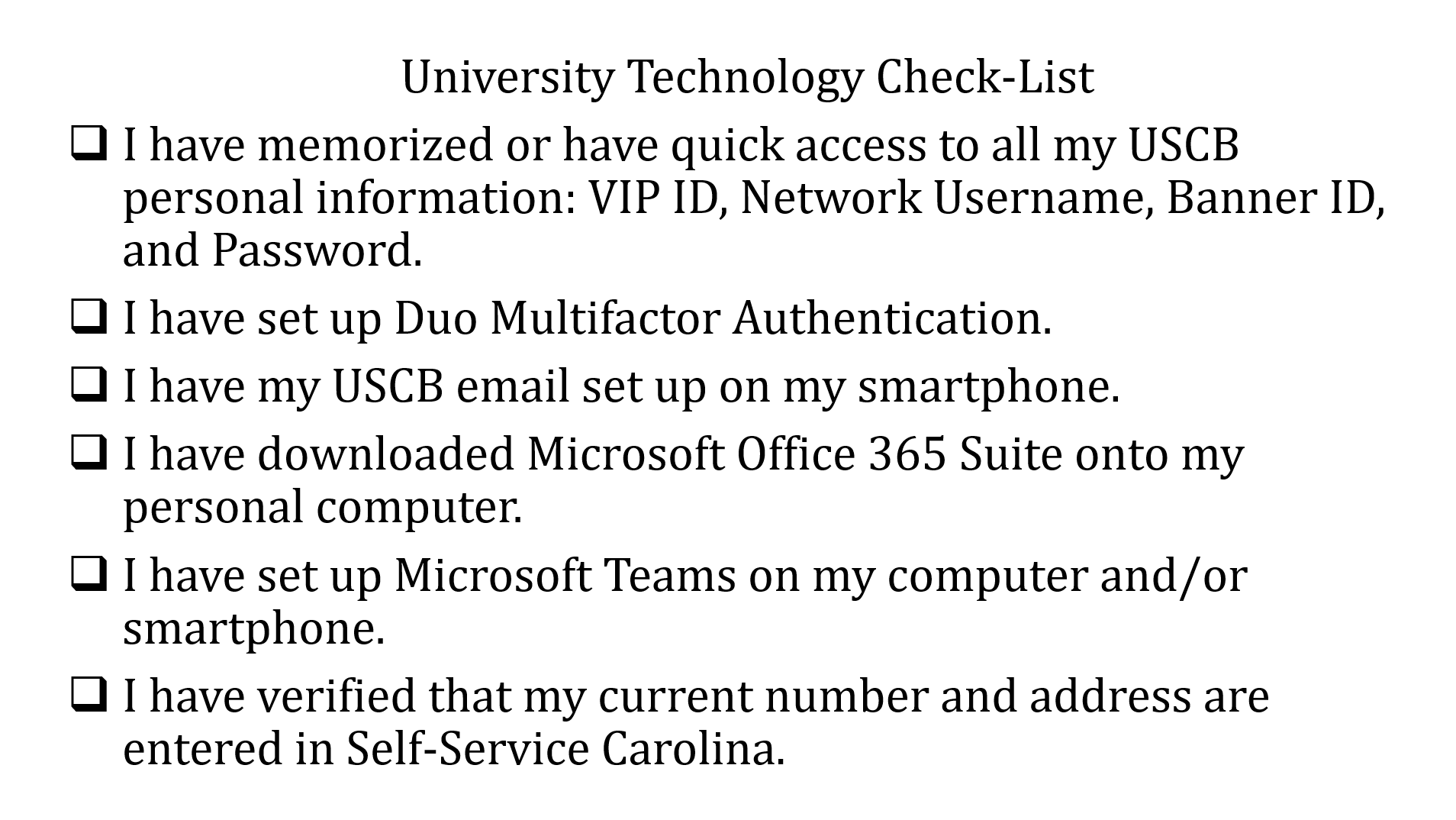
Now that you know how to access your email, it is important that you understand how to manage all the emails you will receive in your USCB email inbox. University faculty and staff will only communicate with you through your USCB email. It is important that you check it regularly and come up with a system for keeping track of important information. You will receive a lot of emails from USCB and you need to review them frequently. Below is a list of the types of emails you should expect to see.
- University Updates and Announcements: These emails will include information about what is going on on campus. You will get this type of email in the event of an emergency on campus, updates about COVID-19, the University's response to a hurricane or other inclement weather situation, and other important campus news and reminders.
- Emails about Campus Event: Student Life will send out weekly emails with information about events going on around campus. This will list any student life, student organization, or other campus activities, as well as reminders about important dates and deadlines.
- Emails from your Instructor Through Blackboard: You instructors will likely communicate with you via Blackboard about all class business. You will also receive an automatic email from Blackboard anytime your instructor uploads a new assignment or submits a grade.
- Emails from your Advisor, Financial Aid, and Other Campus Departments: University offices like Advising, Registrar, Bursar, and Financial Aid will communicate with you frequently throughout the semester, giving you important information about upcoming deadlines.
- Academic Alerts: Your faculty have the ability to submit alerts or commendations about your academic progress through a system called Inspire. If a faculty member submits an alert or commendation for you, you will receive an email from Inspire. Please read these emails thoroughly and reach out for help in the course!
As you can see your University email is going to have a lot of important information that you are going to have to keep track of. All of this information can be really overwhelming, but if you put a system in place for dealing with your email, you will be sure to stay on top of important information.
Junk Mail
The University's email system has a systems in place to identify spam emails, but sometimes emails get through that shouldn't. It is important that you understand how to identify SPAM or Phishing emails. These emails can contain viruses that will not only attack your computer, but could also attack USCB's network. USCB has systems in place that will contain the problem in situations like this, but this could mean that you get locked out of your email until the issue is resolved. In the video below you will learn how phishing emails work and how you can identify them.
Though you want to avoid phishing emails, it is important that you check your junk box and spam filter regularly to make sure important emails from the University didn't end up there by mistake. Also, remember to only use your USCB email to send emails to USCB students, faculty, and staff. Personal emails often get flagged as junk by the USCB spam filter which will delay your emails arrival.
Keeping your Inbox Clean
It is really important to find a way to organize your inbox so you don't lose track of important correspondence. Below are some tools in your email you can use to keep track of everything.
Inbox Zero
This is a email organization system that helps you manage all of your emails and get them out of your inbox when you are done with them. The principles of Inbox Zero are explained in the video below.
Creating Folders
Similar to inbox zero, creating a folder system might be a good option if you are worried that you will have issues using the email search feature to find important emails. As you can see in the image below, Finnegan has created a folder for each of his class, his job as swim instructor, the student organization he is in, and general university updates.
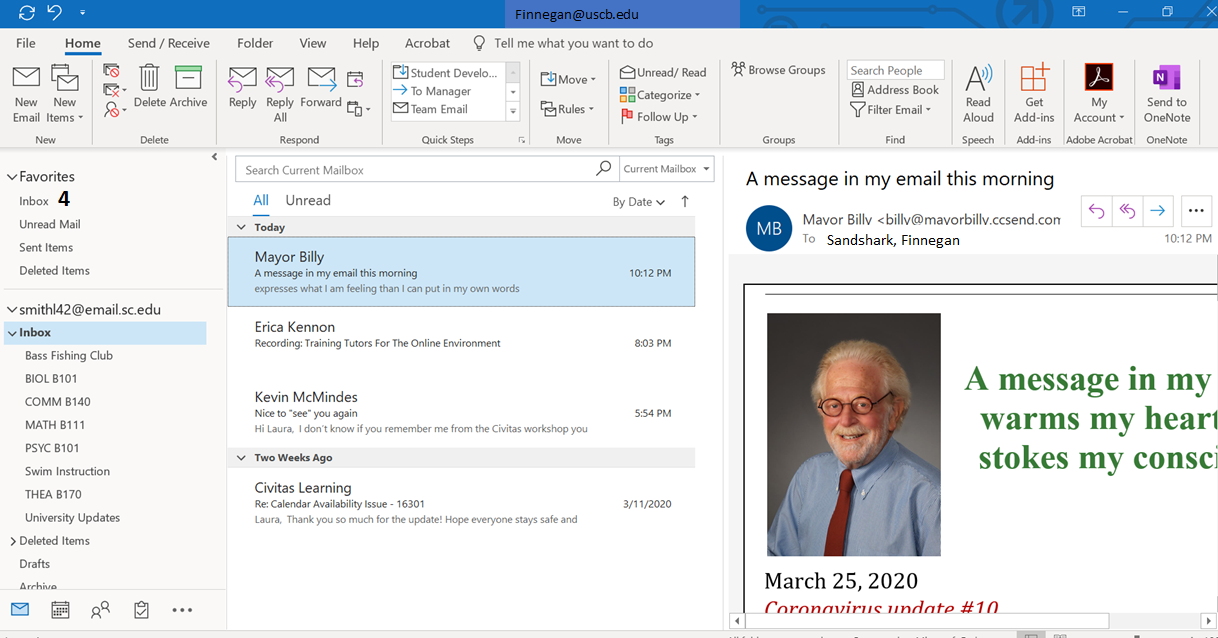
With this system, when a new email comes in, you can read it, reply to if necessary, put important dates or deadlines in your calendar, and then move it to its appropriate folder. If you receive an email that you can't take care of right away you can leave it in your inbox. This way your inbox becomes a task list of items you need to follow up on. If you need to refer back to an email from your math instructor, you can go to the folder and search from there which will make it easier to find. When the semester ends and you don't need a course folder handy anymore, you can move the whole folder to your archive.
Flagging Important Tasks
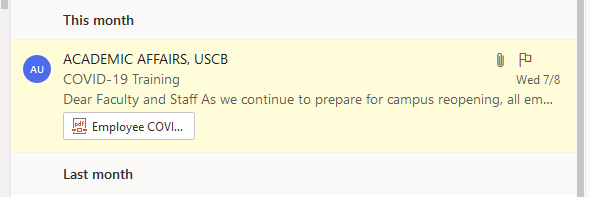
Your email will also allow you to flag emails that still need attention. This is a good tool if you don't have a super formal email organization system. As you can see below, if you flag something, it turns yellow which makes it really easy to identify it quickly. Once you have completed the task you can clear the flag.
Setting Up Rules
While its best not to use your University email when signing up for promotions or making online purchases, it can be difficult to keep your USCB email address ending up on any promotional mailing lists. Chances are, at some point you will start receiving emails from companies trying to sell you stuff in your USCB inbox. This can crowd your inbox and make it difficult for you to easily differentiate the important email from the junk. You can keep these emails from ever showing up in your inbox by setting up rules. If you click on the Settings Gear icon at the top right hand corner of your USCB email inbox, you will find the Rules Settings once you click on 'View all Outlook Settings.'
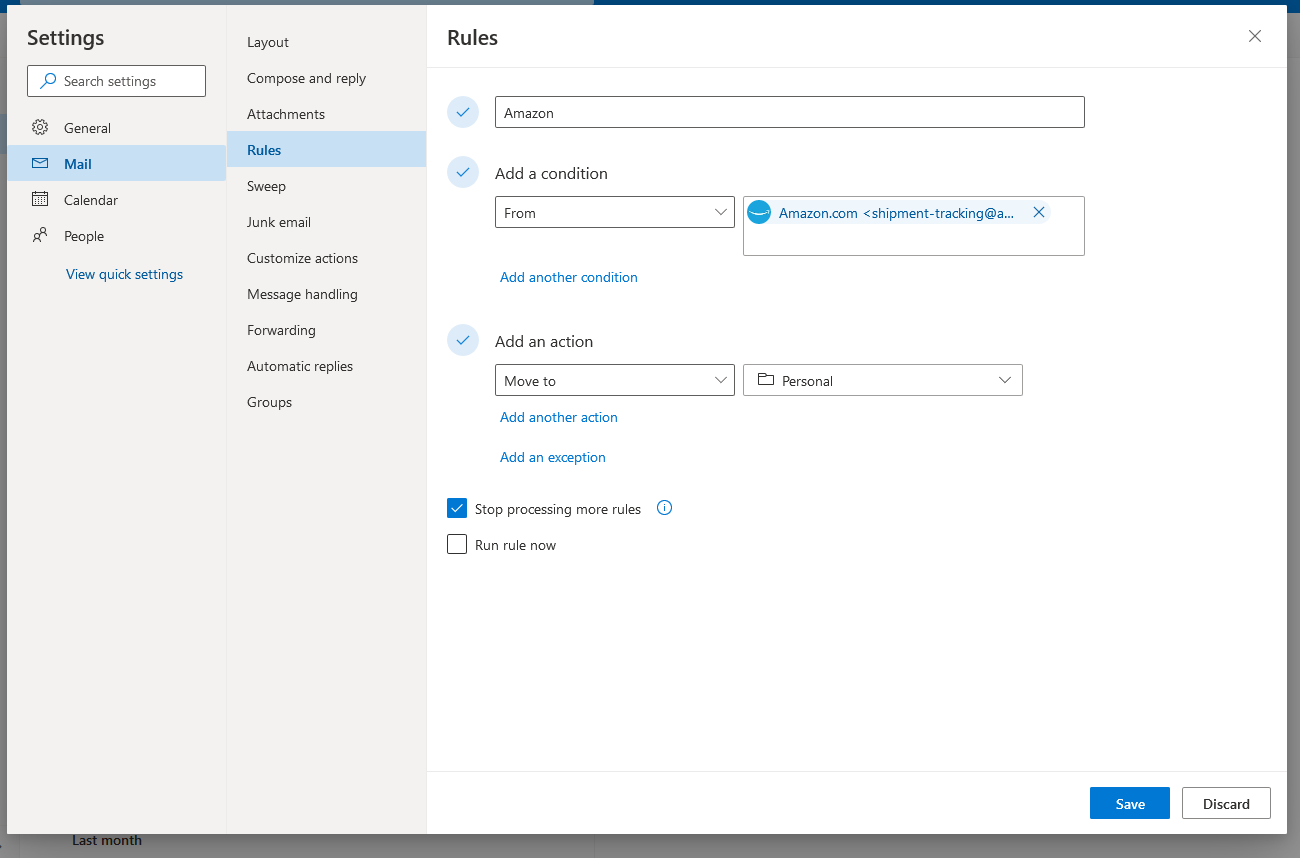
Then, as you can see above, you just need to name the rule, enter the senders email address, the choose the action you want Outlook to automatically take when an email from this sender comes in. You can choose to have the email sent to a folder, or you can have the email automatically deleted.
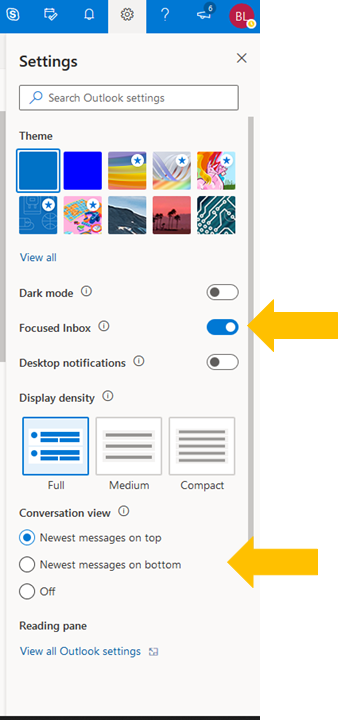
Focused Inbox and Conversation View
Your USCB Email inbox will automatically be set with the Focused Inbox and Conversation View turned on. These are tools that some find really helpful, but also have their downsides.
- Focused Inbox is a feature that uses an algorithm to determine which of your emails are important for you to see right away and which aren't as important. When Focused Inbox is turned on, the algorithm will send less important emails like promotional emails to the other inbox. This sounds great but remember that the algorithm isn't perfect and if you don't check your Other Inbox frequently you could miss a potentially important email.

- Conversation View sorts your email so that all emails in the same thread are bunched together, so instead of having your emails listed in chronological order with every email your have received listed in order, emails that were received days or weeks ago will move to the top when a new email in the thread comes in. This is a great way to keep all the emails about the same topic together, but if multiple emails in the same thread come in while you are away from you email, you might not notice an email in the thread as easily as you would if they were separate entries in your inbox.
You can play around with both of these features to determine if they are helpful to you or not. Turn these settings on or off, click on the Setting Gear icon at the top right hand corner of your USCB email inbox. You can see how to change these setting in the image below.
Activity: How will you practice good email hygiene?
Think about the options for managing your email listed above. Which do you think will work best for you? Why? Is there another trick that you have used in the past that wasn't listed? If yes, what is it?
Normally first-year students at USCB are not advised into online courses if possible. The University prefers to allow students to adjust to college through traditional face-to-face courses before attempting online learning. This is because online courses take a lot of time management and require more self-directed learning and many first-year students struggle with this. However, due to realities of the COVID-19 Pandemic, many of our first-year students are taking online courses or courses with an online component. Even if a student has a completely face-to-face schedule, the uncertainty of the Pandemic may mean that one of more of your courses could move online at any time. Therefore it is important that all new students have an understanding of how to approach an online course and have a plan in place to complete their online courses successfully.
Myths about Learning Online

Students have a lot of preconceptions about online courses. Some of these are true and some are not. Make a list of what you know or have heard from your friends and family about online learning? Overall, do you have positive or negative thoughts about learning online?
Now that you have considered your own perspective on online learning, read the US News article 7 Myths about Online Education.
Look at the list you created. After reading the article have any of your perspectives changed?
Tips for Getting Started in Online Classes
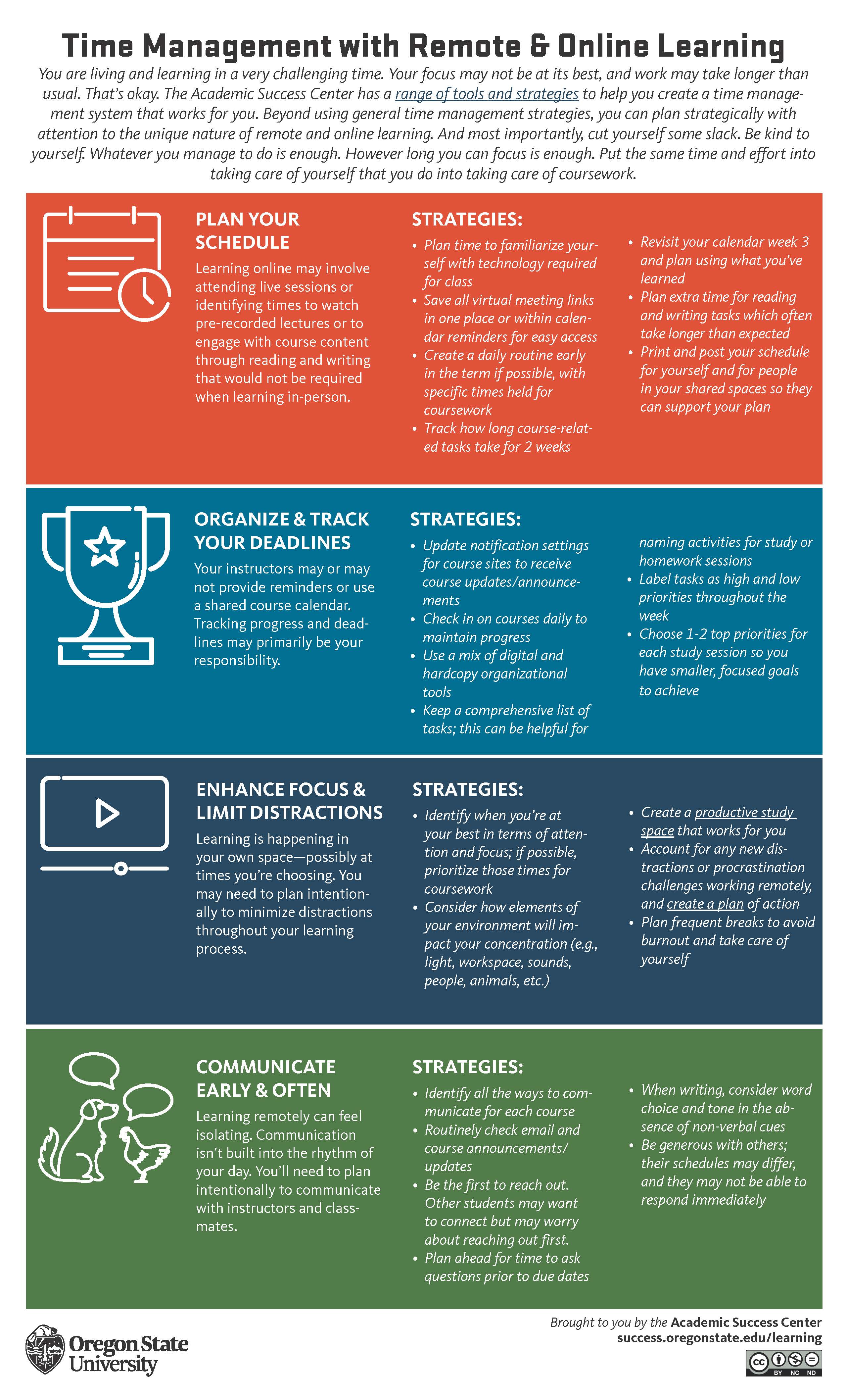
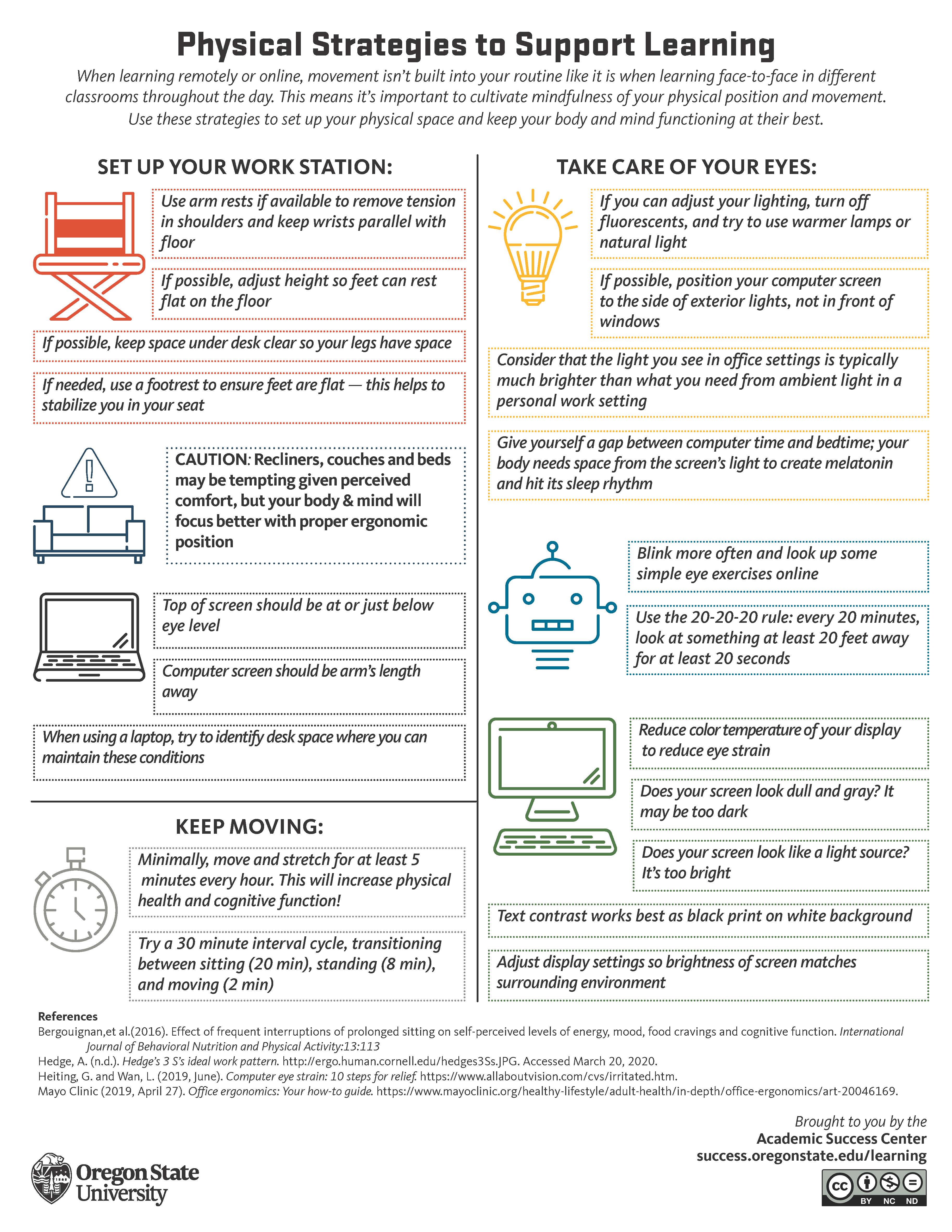
One of the hardest parts of online learning is getting started. Whether your issue with starting your online courses is overcoming procrastination, getting organized, or setting up a space to do your online work, below are some tips that will help.
Discussion Board Posts
Discussion Board Posts are an extremely common assignment for online courses. These posts take the place of the normal class discussion you would be having in a face-to-face course on the reading or other course topics. A lot of students dread doing these posts and feel very uncomfortable writing them. Students who would gladly contribute to class discussions in-person are sometimes perplexed on how to approach a discussion board post.
Ashford University's Writing Center has written a guide for students to help them approach these posts. Click the link below to review the steps for writing these posts.
Writing a Discussion Board Post
Below is an example discussion board post. Notice the writer uses fully developed paragraphs, cites the source of the information they are using to back up their arguments, uses a different paragraph to address each point.
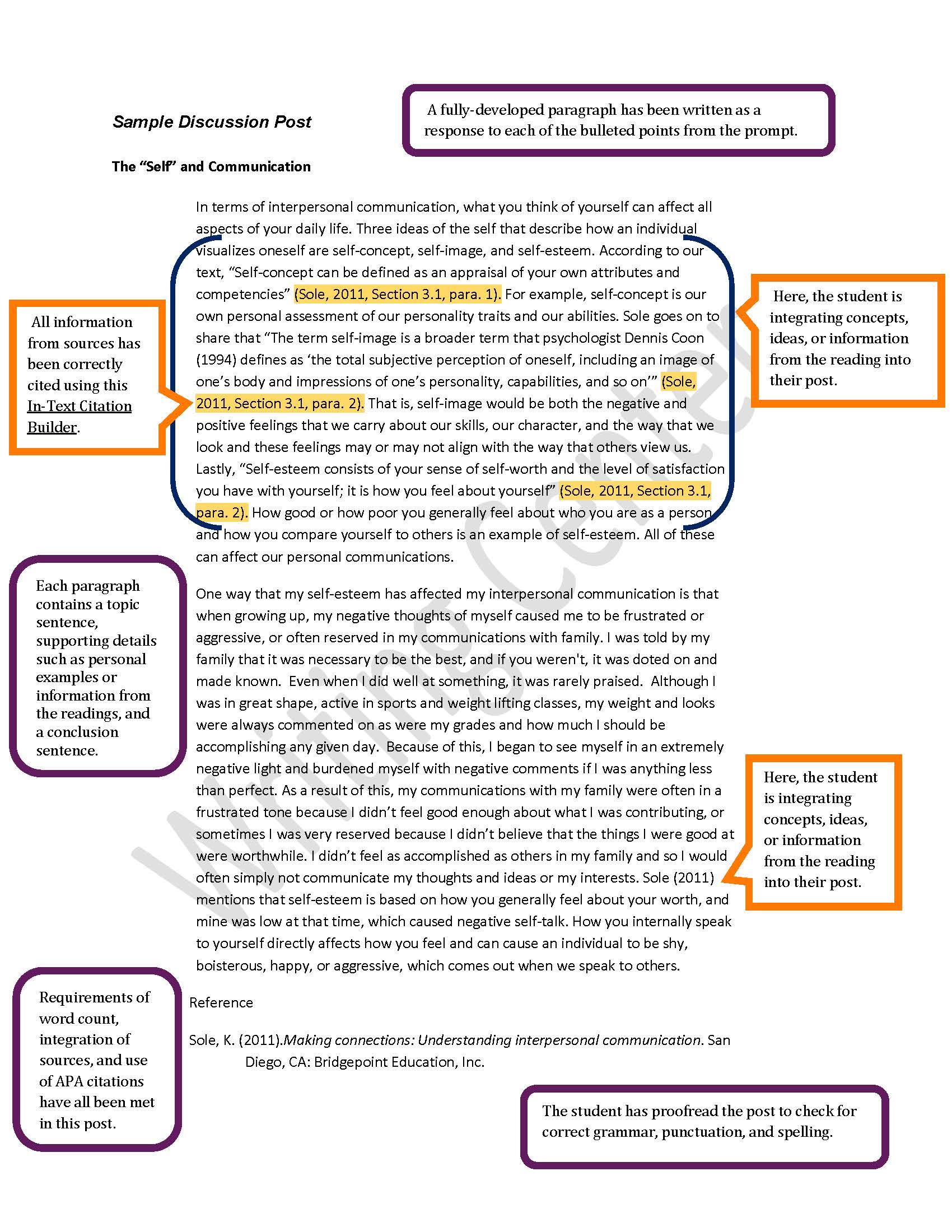
Source: Sample Discussion Board Post, Writing a Discussion Board Post, Ashford University Writing Center.
Discussion Board Responses
Now that you know how to create your initial post, let's discuss response posts. Since discussion board posts are supposed to recreate the class discussion you would have in a face-to-face class, your instructor will likely require you to respond to our classmates posts as well. This can be the most challenging part of the assignment. You cannot simple respond by saying, "that's a great point Karen, good job!" because that doesn't add anything to the conversation.
Here are some tips on how to write responses to your classmates discussion board posts:
Again, Read the Direction Carefully
Your instructor may have one set of expectations for original posts, and an entirely different set of rules for replying to your classmates’ posts. If there aren’t any guidelines in the syllabus about replying to posts, don’t hesitate to ask your instructor what he or she expects replies to include.
Make Meaningful Conversation
Discussion boards are meant to be conversations, where each post builds on the previous comment. Responding to a post gives you the ability to expand the conversation. Reference material from your textbook, class lectures, or relate to your own life experiences when appropriate. Don’t just agree or disagree: continue the conversation! This is called responding constructively - just like construction, you’re building upon a post.
There are three main ways to respond constructively to a post:
- “No, because...”
- “Yes, and…”
- “Yes, but...”
Respectfully Disagreeing - “No, because…”
If you disagree with someone’s post, show that you appreciate that your classmate has an opinion, even if it’s different from your own. Don’t personally attack the writer, and avoid using emotional appeals.
Instead, focus on the logic of view your classmate has: does it make sense? Do the causes and effects as explained really relate to one another? Does one claim necessary follow another? Are there flaws in your classmate’s argument? Ask questions to better understand the writer’s logic.
Agreeing With and Expanding Upon a Post - “Yes, and…”
Let’s say you agree with the writer’s main idea, and you want to add more to it. Take the original opinion or view that your classmate expresses and consider other angles. Are there factors about this topic that your classmate hasn’t mentioned? Do you have insight that provides a clearer picture or helps build the discussion?
Agreeing With and Expanding Upon a Post - “Yes, but…”
This is very similar to “Yes, and…” with the exception that you are playing “devil’s advocate” - you’re pointing out things that don’t quite mesh with the view or opinion your classmate posts. You agree with what your classmate is saying, but you’re pointing out problems with the view or statement that make it harder to defend.
If you’re getting points taken off for discussion board assignments and you’re not sure why, ask your instructor for feedback. You can also sign up for a Writing Center appointment for help - they aren't just for essays! The tutors can review your discussion board posts and replies, and give you feedback to help you say what you mean to say.
Let’s say a classmate posts the following message about college tuition on your class discussion board:
College tuition is too high. College administrators make too much money and are profiting off making college so expensive. College wouldn't be so expensive if it wasn't for their greed.
“No, Because…”
Here are two examples of responses you could give that respectfully disagree:
- I respectfully disagree with your views on college tuition. I do understand your concerns, but I wonder whether college administrators are the only reason why college is so expensive. After doing research on salary.com I found that the CFO of a public college doesn't make near as much as the CFO of a corporation.
- Perhaps we might consider the logic employed in this post: while I understand your concern for college tuition, I do not understand that connections you’re drawing. Perhaps you—or someone else who agrees with this post—could elaborate upon why you feel this way?
Both responses are respectful of your classmate’s position, even if you strongly disagree. They point to issues with the writer’s logic and end with questions which continue the discussion.
“Yes, and…”
Here’s an example of agreeing with the post, and adding onto it:
I definitely see your point about college tuition. In fact, I know someone whose college raised their tuition last year and the administrators all got raises. I would also like to add this question: What about online classes? Should students pay less for online class than they do for in-person?
You’re adding another point to the original question. This helps continue the conversation with other students who may also comment on this post, and gives the conversation more depth.
“Yes, but…”
Here’s an example of agreeing with the post, but disagreeing with some parts:
I agree that college tuition is way to high, but I wonder if the lack of funding from federal, state, and local government is more of the reason than administrators. Since USCB is a non-profit institution all of our tuition has to go back into instruction. I wonder if funding went up, if tuition would go down?
Adapted from: Bladen Community College
Activity: Your Respond to the Post
Now that you know how to properly respond to a discussion board post, write your own response to the post about college tuition. Use the 'no, because', 'yes, and', or 'yes, but' statements explained in the reading to write your response.