Home

Art Education Materials from the MERLOT Teacher Education Editorial Board
Bruce Bennett, Robin Blackman, Loretta Driskel, Doris Dickerson, Vito Dipinto, Cris Guenter, Angela Gunder, Elaine Lawrence, Jane Moore, Stephanie Robinson, Laurie Tenzer, Mary Wall, David Wicks, Esperanza Zenon
STEM to STEAM Materials
Integrating the arts into science, technology and mathematics is an important issue in today's classroom. The materials below will help you to make that integration easily, using technology that has been classroom-tested.
 Paper Project
http://www.merlot.org/merlot/viewMaterial.htm?id=83964&hitlist=keywords=paper+project&fromUnified=true
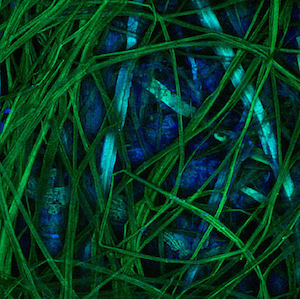
This module was selected as the 2005 Classics Award Winner by the MERLOT Teacher Education Editorial Board for its innovative and best practices approach to cross-curricular investigation, discovery, and reflection for K-university learners. Since 1998, the Paper Project has been exploring the structure and beauty of paper. The project chronicles handmade and mouldmade paper through images produced by scanning electron microscopy and a scanning-laser confocal microscope. The content blends the world of art and science. Teaching standards addressed include K-8 visual arts, technology, and science. It reveals how science, art, and technology are entwined and would be appropriate material for cross-disciplinary integrated teaching by faculty who team teach at the middle school level. The development of this site began with a simple scientific question - What can modern microscopy tell us about paper? - and it has grown in many different directions from that point. Materials include written comparisons of old and new technology (the history of microsopes, the history of paper), step-by-step instructions for making paper, and microscopic images of paper with depth resolution or at various magnifications displayed side-by-side for easy comparison (powers of 10: 100x and 1000x). Students can use 3-D glasses to enjoy part of this site.
How can art educators use this material?This is a vast and beautiful exploration of paper. You could connect this to a science lesson, have students create their own paper, and find out about traditional paper-making. There are cookbooks and guides for paper-making at home, making 3-D glasses. There is a slideshow for teachers with notes. The web gallery has many images of scanned paper. Teachers could assign students to investigate the web gallery of microscopic pictures of paper; this could be a catalyst to creating their own paper art. The archives are full of exhibits, papers, and articles related to the structure of paper since 1998. This material would be appropriate for high school and beyond.
Elementary art educators could use the site to find out how to create their own paper, perhaps in collaboration with the science teachers.
 ArtsEdge http://www.merlot.org/merlot/viewMaterial.htm?id=91127&hitlist=keywords=Artsedge&fromUnified=true
ArtsEdge supports the place of arts education at the center of the curriculum through the creative and appropriate uses of technology. ArtsEdge helps educators teach in, through, and about the arts. As the National Arts and Education Information Network, ArtsEdge provides tools and resources that are designed to help young people and adults learn about the arts. Features at this extensively rich site include: Newsbreak--current updates on what's happening in the arts and education, Teaching Materials--standards-based units, lessons, and activities that put the arts in ALL disciplines, and Professional Resources--planning and contact information and an excellent site of all the national standards.
How can art educators use this material?This is a website created by the Kennedy Center. The arts are the core of the site; there are integrated lessons K-12 for teachers to use. The goal of ArtsEdge is to connect people to people and provide digital arts centered learning experiences, including podcasts, and video clips. The Arts National Standards are located here and items are cross-linked for multiple access by educators, families, and students. You can also access through collections or media. This is a powerful site--ten educators and artists vetted the lessons that had been submitted so that quality would be consistent. The lessons provide handouts, links to media and images in the collections.
Drawing and Painting Materials
Not every classroom has access to all the art materials that they would like. Technology allows students to use a variety of materials, to integrate technology and to produce wonderful, interesting art. These are materials that we've used in our teacher education and in K-12 classrooms.
The Artist's Toolkit
Explore the tools that artists use like line, color, shape, space (linear and atmospheric perspective), movement and balance to build works of art. The site is interactive, annimated, and allows users to create works based on the tools that they've learned about.
How can this material be used by art educators?
This is a resource for students and teachers to create their own artwork that can be imported into various digital venues (i.e. newsletters, collages, websites).
It's important that teachers realize that they cannot just "copy" a cartoon or artwork from the internet and use it in their classes. This material allows teachers to create their own artwork for use in classrooms.
This tool allows teachers to bring in videos of artists into their classrooms.
Artlex.com
http://www.merlot.org/merlot/viewMaterial.htm?id=76964&hitlist=keywords%3DartLex&fromUnified=true
This site offers definitions for more than 3,200 terms used in visual culture, along with thousands of images, pronunciation notes, great quotations and cross-references. There is an easy access index list provided and there are direct shortcuts to some of the longer articles. This site has received recognition and awards from various groups including ArtsEdNet from the Getty Education Institute, The Britannica Internet Guide, the National Art Education Association, and the Web Feet Seal of Approval for 2001.
How can this material be used by art educators?
ArtLex has been over a decade in the making to collect terms used in art. The hyperlinks and images that are included allow teachers and students to go beyond a simple text definition. This site could supplement a vocabulary study in the art classroom or assist in understanding when using art in a history lesson, for instance.
Artrage
http://www.merlot.org/merlot/viewMaterial.htm?id=721677&hitlist=keywords%3DArtRage&fromUnified=true
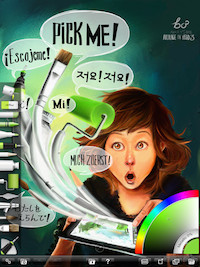
The interface has been designed specifically for the iPad, compacted to maximze creative space without hiding away critical functions such as tool and color selection. As you paint, it gets out of the way so that you don't have to stop and manually adjust panels. With support for multi-touch gestures, important shortcuts are available without needing any interface.
Record your paintings! The ArtRage Script system lets you record strokes while you paint for playback in desktop versions of the product at higher resolution.
Tools:
- Oil Brush, Watercolor, Airbrush, Palette Knife, Paint Roller, Paint Tube, Inking Pen, Pencil, Marker Pen, Chalk, Crayon, Eraser, Flood Fill.
Layers:
- Unlimited layers, Photoshop standard blend modes, visibility and opacity controls. Scale, rotate, and position layer contents independently.
Recording:
- Record your paintings then play them back in a desktop version of ArtRage Studio or Studio Pro at higher resolution. Note: Studio does not support some palette knife features present in the iPad version.'
This app costs $4.99
How can this material be used by art educators?
ArtRage provides an authentic natural venue for students and teachers to draw and paint. The design of the app allows you to focus on creating without digital distractions. The app allows students to use tools that might be not available to them in a traditional classroom---you have a complete art room of tools and materials in this one app. So students and teachers can explore techniques before investing in costly actual materials.
Sketchbook Express
Sketchbook Express is a drawing program available for both Apple and Android. It allows users to create doodles, quick sketches or artwork on the go. It features full screen workspace with support for any device orientation. The Canvas size depends on the display of the tablet. There are 15 preset brushes, including pencils, pens, markers and a fill tool. There are also in-app purchases available for additional tools. The layering allows for users to build up a drawing and import layers from the Photo Library. There are text tools, a color wheel, and a gallery to store and view work in progress. On the Apple machines, there is the option to set iCloud as a default location to save canvases. This is a free app.
How can this material be used by art educators?
Students and teachers can use this free app to generate ideas, sketches, plans, and even take notes. And like a traditional sketchbook, this app can be used to log sketches that could show growth over time. There are variety of brushes, tools, and colors that can be used to model art techniques and styles. Created work is saved to a gallery and can be shared on variety of platforms. This is handy for critiques. The illustration tools in the app can be used to develop lessons that address color, line, texture, and shading. By combining some of the tools, teachers can create engaging lessons like a textured collage or modifying images using the layers feature.
Art Appreciation Materials
It's important to have a history of art, a knowledge of what's come before. The materials below will help you to integrate that into your classroom.
Life of Art App for iPad
'How do objects end up in a museum? Discover the answer to that question from the artworks themselves in this app from the J. Paul Getty Museum. The Life of Art app enables users to retrace the lives of a lidded bowl, a silver fountain, a side chair, and a wall light in the Getty's collection by examining physical clues. The interactive app features stunning photography, animations, video, and 360 rotations that bring the rich biographies of these objects to life.
This app was created in conjunction with the 2012 exhibition The Life of Art: Context, Collecting, and Display at the Getty Center.'
This is a free app
How can this material be used by art educators?
This app helps teachers and students understand the context, the process of collecting, and the manner of displaying artwork. The app was formed when there was an actual exhibit at the Getty, anchored around context, collecting, and displaying. By using four art objects from different cultures, the app shows a manageable way for teachers to share with their students with interactive presentations.
MOMA Red Studio
Red Studio, developed by MoMA in collaboration with high school students, explores issues and questions raised by teens about modern art, today's working artists, and what goes on behind the scenes at a museum. Featuring interviews by teens of artists Vito Acconci and Shahzia Sikander, along with the interactive youDESIGN and REMIX activities, and the talk back bulletin board, Red Studio will be periodically updated and expanded. There are many new features, activities, and contests to come.
How can this material be used by art educators?
This is a site for teens--junior and senior high students could use this independently, beyond the classroom. It includes teen interviews, podcasts, video clips that help students consider careers in the arts. This site could be used in a homeroom situation, discussing careers. There are contests that classes/individuals can participate in. The site is designed in collaboration with high school students. It could be used by having students review the interviews, and then go out into their own communities and conduct their own interviews of local artists. This site could be used for research assignments and independent study work.
The site is constantly being updated so check it frequently.
Google Art Project
The Google Art Project is one of the three areas within the Google Cultural Institute. The Google Cultural Institute: Google Art Project is a collaboritive partnership with several world acclaimed art museums (representing 40+ countries) to display a gallery collection of (40,000+ high resolution) artworks by various artists sorted by historical time periods/movements, location, and more. Here the viewer can easily select an artwork to zoom in and out to enlarge the size and detail . Also, you can select and put two art work selections side-by side for making comparisons/contrasts in their artistic style, medium, theme, genre, subject matter, and more. In addition, Google's "Wondows View Project" allows you to view an impressive selection of cultural landmarks and world heritage sites. This is an excellent site for Art History teachers and students.
How can this material be used by art educators?
Students and teachers can view art work in multiple ways. There are so many galleries and as a teacher, you can create your own gallery of images. Using Google Maps, you can look through the collection and virtually walk through the museums that are labeled with that icon. You can compare images, which would support discussions and critiques. Literature teachers could use art images to share with their students as a context for the works they are reading. Many of our students have not been in actual museums and this site makes the great works of art accessible.
Students can search through the collections, choose a museum, then choose a piece of art and gather information about that piece of art. This could be posted on a discussion board or shared via a whiteboard. You can zoom in a view techniques in ways that you might not be able to in a brick and mortar museum.